Local AI Lab --- Inference on Two GPUs --- llama.cpp on CUDA and ROCm
The cluster is up. IOMMU groups are sorted --- each GPU is in its own group, PCI IDs documented, ACS override confirmed working.
Before running an install script, I want to spend a few paragraphs on the inference runtime decision. The straight version : llama.cpp wins for this setup, and the reasons are specific to this hardware and model combination --- not a generic preference. If you want to skip ahead to the build, jump to Prerequisites. If you want to learn why, continue reading here.
The runtime decision
Why not Ollama
Ollama is the obvious starting point for local inference and it would work. For most homelab setups it’s the right option. For this one, two things push it out.
The primary model needs MTP to be useful. The NVIDIA container will run Qwopus3.6-27B-v2-MTP --- a fine-tune of Qwen3.6-27B that adds Multi-Token Prediction heads for speculative decoding. The MTP heads are the reason to use this model over base Qwen3.6-27B : the author’s benchmark shows 10.46 T/s overall vs 6.29 T/s on the same prompts, a 1.66x wall-clock speedup on coding, DevOps, and math tasks. Ollama does not support Qwen3 MTP heads. Run it through Ollama and you get the fine-tune weights but not the throughput advantage --- the model degrades to plain Qwen3.6-27B speed. llama.cpp has Qwen3 MTP support in recent builds.
The NVIDIA card needs KV cache control. The RTX 5060 Ti has 16 GB of VRAM. Qwopus at Q3_K_M (the right quant for this card --- more on that below) uses 13.5 GB in model weights, leaving roughly 2.5 GB for KV cache. That’s tight for multi-file coding work. llama.cpp’s --cache-type-k q8_0 --cache-type-v q8_0 roughly halves the per-token KV cache cost, effectively doubling usable context headroom within that 2.5 GB. Ollama does not expose KV cache type. On a card where headroom is the binding constraint, not having that capability will matter in larger coding tasks.
With those two decisions made for the NVIDIA side, the AMD side follows naturally : same runtime, same config pattern, one less variable when debugging ROCm. Using Ollama on the AMD container and llama.cpp on NVIDIA would mean two different model management approaches, two different service config formats, and two different ways to diagnose inference problems. There’s no strong reason for doing that.
Model and quant selection
NVIDIA : Qwopus3.6-27B-v2-MTP at Q3_K_M
The GGUF size table from HuggingFace makes the quant choice straightforward :
| Quant | Size | Fits 16 GB | KV cache headroom |
|---|---|---|---|
| Q4_K_M | 16.8 GB | ❌ overflows | — |
| Q4_K_S | 15.8 GB | ⚠️ ~200 MB | not usable |
| Q3_K_L | 14.6 GB | ✅ | ~1.4 GB — snug |
| Q3_K_M | 13.5 GB | ✅ | ~2.5 GB — workable |
| Q3_K_S | 12.3 GB | ✅ | ~3.7 GB — comfortable |
AMD : Gemma 4 E4B at Q5_K_M
The RX 6650 XT has 8 GB VRAM. Gemma 4 E4B is 8B total params (sparse architecture --- “E4B” means ~4B active at inference time). The size table from bartowski’s imatrix build:
| Quant | Size | KV cache headroom |
|---|---|---|
| Q8_0 | 8.03 GB | ~0 MB --- no room |
| Q6_K | 6.33 GB | ~1.7 GB |
| Q5_K_M | 5.82 GB | ~2.2 GB |
| Q4_K_M | 5.41 GB | ~2.6 GB |
Q5_K_M hits the right spot : high quality per bartowski’s imatrix calibration, 2.2 GB of KV cache headroom for a conversational model. This container’s role is fallback and ROCm validation --- not the primary coding agent. The model choice is easy to swap : same runtime, same API, different GGUF path in the systemd unit.
Prerequisites
Apt repository setup
Proxmox VE 9 uses the DEB822 format for apt sources (.sources files in /etc/apt/sources.list.d/ --- no sources.list). On a fresh install, the enterprise repos are active by default and will fail without a subscription key. This needs to be sorted before any packages can be installed.
Three files to fix :
Add non-free to Debian sources (needed for the NVIDIA driver) :
sed -i 's/Components: main contrib non-free-firmware/Components: main contrib non-free non-free-firmware/g' \ /etc/apt/sources.list.d/debian.sourcesDisable the enterprise PVE repo, add the no-subscription repo :
cat > /etc/apt/sources.list.d/pve-enterprise.sources << 'EOF'# Disabled - no subscription key# Types: deb# URIs: https://enterprise.proxmox.com/debian/pve# Suites: trixie# Components: pve-enterprise# Signed-By: /usr/share/keyrings/proxmox-archive-keyring.gpgEOF
cat > /etc/apt/sources.list.d/pve-no-subscription.sources << 'EOF'Types: debURIs: http://download.proxmox.com/debian/pveSuites: trixieComponents: pve-no-subscriptionSigned-By: /usr/share/keyrings/proxmox-archive-keyring.gpgEOF
Switch the Ceph repo from enterprise to no-subscription :
cat > /etc/apt/sources.list.d/ceph.sources << 'EOF'Types: debURIs: http://download.proxmox.com/debian/ceph-squidSuites: trixieComponents: no-subscriptionSigned-By: /usr/share/keyrings/proxmox-archive-keyring.gpgEOFapt updateNo 401/403 errors from enterprise repos in the output means it’s clean.
From the previous post, these should also be in place :
- Proxmox cluster healthy (
pvecm status→Quorate: Yes) - IOMMU active on pve1 (the desktop workstation) :
cat /proc/cmdline- Should contain: amd_iommu=on iommu=pt pcie_acs_override=downstream,multifunction
- Which it does :

-
GPU devices in separate IOMMU groups, PCI IDs is already confirmed from when I initially setup the cluster:
- RTX 5060 Ti :
10de:2d04(VGA),10de:22eb(Audio) --- Groups 27, 28 - RX 6650 XT :
1002:73ef(VGA),1002:ab28(Audio) --- Groups 23, 24
- RTX 5060 Ti :
-
datapoolZFS mirror registered as a Proxmox storage target. Ifpvesm statusreturns nothing for datapool, the pool exists in ZFS but hasn’t been registered --- run this first :
pvesm add zfspool datapool --pool datapool --content images,rootdirThen confirm :
pvesm status | grep datapool# Should show: datapool zfspool active- Debian 13 LXC template cached on pve1. If not present, download it first :
pveam updatepveam available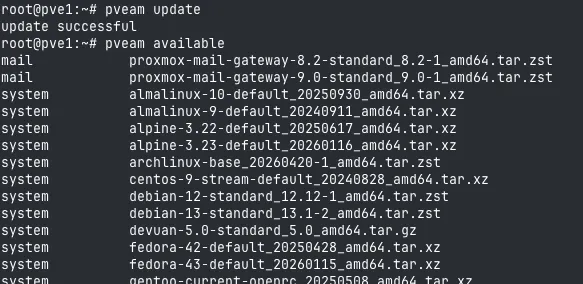
- Download
pveam download local debian-13-standard_13.1-2_amd64.tar.zstConfirm it landed :
pveam list local | grep debian-13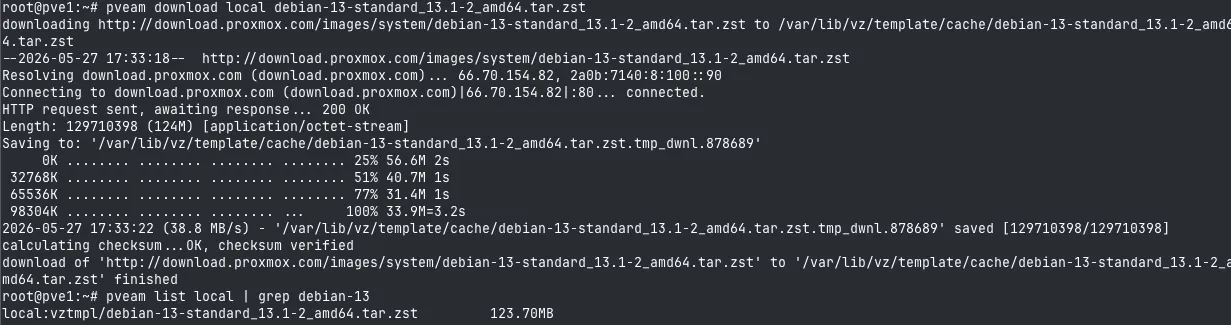
Overview
Two LXC containers, two GPU paths, same runtime :
| Container | GPU | Runtime | Port | Model | Quant |
|---|---|---|---|---|---|
inference-nvidia | RTX 5060 Ti 16 GB | llama-server + CUDA | 8080 | Qwopus3.6-27B-v2-MTP | Q3_K_M |
inference-amd | RX 6650 XT 8 GB | llama-server + ROCm | 8081 | Gemma 4 E4B | Q5_K_M |
Both expose OpenAI-compatible endpoints on their respective ports. OpenClaw and Pi point at the NVIDIA endpoint for coding tasks; the AMD endpoint is conversational fallback.
NVIDIA path : inference-nvidia LXC
NVIDIA driver on the host
For LXC GPU passthrough, the NVIDIA driver runs on the Proxmox host --- the LXC shares the host kernel and only needs the matching userspace libraries. The /dev/nvidia* device nodes need to exist on the host before any passthrough config can reference them.
Install the kernel headers and detection tool :
apt install -y proxmox-headers-$(uname -r) nvidia-detectCheck what driver version is recommended for the RTX 5060 Ti :
nvidia-detectOn this system nvidia-detect correctly identifies the RTX 5060 Ti (GB206, Blackwell) but reports it as unsupported by the 550.x driver in Debian’s non-free repo. Blackwell requires 570+.
Add the NVIDIA CUDA repo :
curl -fsSL https://developer.download.nvidia.com/compute/cuda/repos/debian13/x86_64/cuda-keyring_1.1-1_all.deb \ -o /tmp/cuda-keyring.debdpkg -i /tmp/cuda-keyring.debapt updateInstall the driver. On Debian, the CUDA repo uses cuda-drivers as the meta-package (not nvidia-driver-610 as on Ubuntu) :
apt install -y proxmox-headers-$(uname -r) cuda-driversThen install the open kernel modules --- Blackwell (RTX 50 series) requires them. cuda-drivers alone installs the closed-source modules, which fail silently on GB206 :
apt install -y nvidia-openupdate-initramfs -urebootAfter reboot, verify :
nvidia-smils /dev/nvidia*Expected output confirms driver 610.43.02, card recognised as RTX 5060 Ti with 16311 MiB VRAM, and the five device nodes present : /dev/nvidia0, /dev/nvidiactl, /dev/nvidia-modeset, /dev/nvidia-uvm, /dev/nvidia-uvm-tools.
Create the LXC
GPU passthrough into an LXC requires a privileged container. The NVIDIA device nodes are bind-mounted from the host --- the LXC shares the host kernel and its already-loaded nvidia module. This is different from VM passthrough (which hands the raw PCIe device to the VM via vfio-pci) : here, the nvidia driver runs on the host and the container uses the resulting device nodes.
pct create 100 local:vztmpl/debian-13-standard_13.1-2_amd64.tar.zst \ --hostname inference-nvidia \ --storage datapool \ --rootfs datapool:32 \ --cores 4 \ --memory 8192 \ --net0 name=eth0,bridge=vmbr0,ip=dhcp \ --unprivileged 0 \ --features nesting=1Add the GPU device entries to the container config. The cgroup2 major numbers must match the actual devices --- check them first :
ls -la /dev/nvidia* | awk '{print $5, $6, $NF}'# 195 = nvidia0, nvidiactl, nvidia-modeset# 506 = nvidia-uvm, nvidia-uvm-tools# 510 = nvidia-caps (not needed for inference)cat >> /etc/pve/lxc/100.conf << 'EOF'lxc.cgroup2.devices.allow: c 195:* rwmlxc.cgroup2.devices.allow: c 506:* rwmlxc.cgroup2.devices.allow: c 510:* rwmlxc.mount.entry: /dev/nvidia0 dev/nvidia0 none bind,optional,create=filelxc.mount.entry: /dev/nvidiactl dev/nvidiactl none bind,optional,create=filelxc.mount.entry: /dev/nvidia-modeset dev/nvidia-modeset none bind,optional,create=filelxc.mount.entry: /dev/nvidia-uvm dev/nvidia-uvm none bind,optional,create=filelxc.mount.entry: /dev/nvidia-uvm-tools dev/nvidia-uvm-tools none bind,optional,create=fileEOFStart the container and confirm the device nodes are visible inside :
pct start 100pct exec 100 -- ls /dev/nvidia*# Should show: /dev/nvidia0 /dev/nvidiactl /dev/nvidia-modeset /dev/nvidia-uvm /dev/nvidia-uvm-tools# The ls: cannot access '/dev/nvidia-caps' error is harmless --- that's the MIG directory, not needed.Build llama.cpp with CUDA support
Inside the container, add the CUDA repo and install the toolkit and build dependencies :
pct exec 100 -- bash -c "apt update && apt install -y curl wget ca-certificates && \curl -fsSL https://developer.download.nvidia.com/compute/cuda/repos/debian13/x86_64/cuda-keyring_1.1-1_all.deb \ -o /tmp/cuda-keyring.deb && \dpkg -i /tmp/cuda-keyring.deb && \apt update"The CUDA toolkit version in the debian13 CUDA repo is 13.x (matching the driver), not 12.x :
pct exec 100 -- bash -c "apt install -y \ cuda-toolkit-13-3 \ libcuda1 \ build-essential \ cmake \ git \ python3-pip \ python3-venv \ libcurl4-openssl-dev"Register the CUDA library path with the dynamic linker :
pct exec 100 -- bash -c "echo '/usr/local/cuda/lib64' > /etc/ld.so.conf.d/cuda.conf && ldconfig"Clone and build llama.cpp. Blackwell is sm_120 (-DCMAKE_CUDA_ARCHITECTURES=120). The CUDA compiler also needs to be pointed to explicitly since /usr/local/cuda/bin isn’t in PATH by default :
pct exec 100 -- bash -c "cd /opt && git clone https://github.com/ggml-org/llama.cpp && cd llama.cpp && \cmake -B build \ -DGGML_CUDA=ON \ -DCMAKE_CUDA_ARCHITECTURES=120 \ -DCMAKE_CUDA_COMPILER=/usr/local/cuda/bin/nvcc \ -DCMAKE_BUILD_TYPE=Release && \cmake --build build --config Release -j\$(nproc)"Build takes a few minutes. Confirm the binary runs without CUDA errors :
pct exec 100 -- /opt/llama.cpp/build/bin/llama-server --version# Should show version string only --- no "failed to initialize CUDA" errorDownload the model
pct exec 100 -- bash -c "pip install huggingface-hub --break-system-packages && mkdir -p /opt/models/qwopus-27b"pct exec 100 -- bash -c "/usr/local/bin/hf download \ Jackrong/Qwopus3.6-27B-v2-MTP-GGUF \ Qwopus3.6-27B-v2-MTP-Q3_K_M.gguf \ --local-dir /opt/models/qwopus-27b"It’s a 13.5 GB download. Confirm it landed :
pct exec 100 -- ls -lh /opt/models/qwopus-27b/systemd service
Background processes started via pct exec do not survive when the exec shell exits. Use a systemd service inside the container :
pct exec 100 -- bash -c "cat > /etc/systemd/system/llama-server.service << 'EOF'[Unit]Description=llama.cpp inference server (NVIDIA)After=network.target
[Service]Type=simpleEnvironment=LD_LIBRARY_PATH=/usr/local/cuda/lib64ExecStart=/opt/llama.cpp/build/bin/llama-server \  --model /opt/models/qwopus-27b/Qwopus3.6-27B-v2-MTP-Q3_K_M.gguf \  --n-gpu-layers 99 \  --ctx-size 8192 \  --cache-type-k q8_0 \  --cache-type-v q8_0 \  --flash-attn on \  --host 0.0.0.0 \  --port 8080Restart=on-failureRestartSec=5
[Install]WantedBy=multi-user.targetEOFsystemctl daemon-reload && systemctl enable --now llama-server"
The flags that matter for this graphics card :
--n-gpu-layers 99--- pushes all 65 layers + the MTP head to VRAM--cache-type-k q8_0 --cache-type-v q8_0--- halves the per-token KV cache footprint, doubling usable context within the ~2 GB headroom--flash-attn on--- reduces peak VRAM during attention computation (note : recent llama.cpp requires expliciton|off|auto, not just the flag)LD_LIBRARY_PATH=/usr/local/cuda/lib64--- required in the service environment since the CUDA libs aren’t in the system linker path by default
Watch the journal to confirm model load :
pct exec 100 -- journalctl -u llama-server -f# Wait for: "server is listening on http://0.0.0.0:8080"Smoke test
Confirm the model is on the GPU before sending a request :
nvidia-smi --query-gpu=memory.used,memory.free --format=csv# Expected: ~13892 MiB used, ~1995 MiB freeSend a test completion. Use at least 1024 tokens --- Qwen3 thinking tokens count against max_tokens, and a 150-token limit will exhaust the budget during the reasoning phase before producing any content :
curl -s http://$(pct exec 100 -- hostname -I | awk '{print $1}'):8080/v1/chat/completions \ -H "Content-Type: application/json" \ -d '{ "model": "qwopus", "messages": [{"role":"user","content":"Write a bash one-liner to count lines in all .log files recursively."}], "max_tokens": 1024, "stream": false }' | python3 -m json.tool | grep -A 15 '"timings"'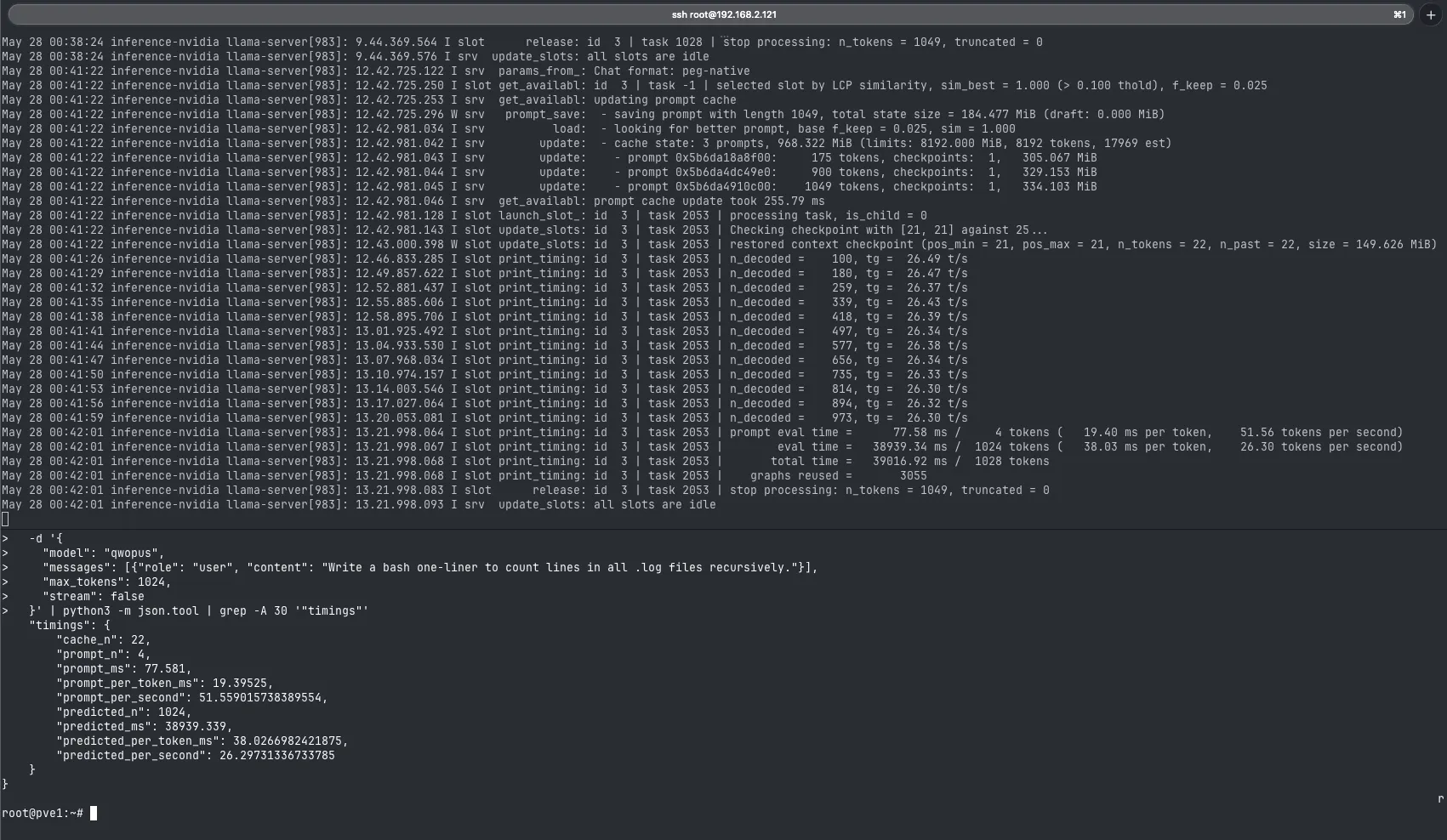
Actual results on the RTX 5060 Ti with this setup :
| Metric | Value |
|---|---|
| VRAM used (model + KV cache) | 13,892 MiB |
| VRAM free | 1,995 MiB |
| Prompt processing | 51.6 tokens/sec |
| Generation speed | 26.3 tokens/sec |
| Context size | 8,192 tokens |
26.3 T/s for a 27B Q3_K_M model on a single 16 GB GPU is a solid result. The Blackwell sm_120 architecture with CUDA graphs active (USE_GRAPHS = 1) and native FP4 path (BLACKWELL_NATIVE_FP4 = 1) is doing meaningful work here.
AMD path : inference-amd LXC
Why Ubuntu, not Debian
The NVIDIA container uses Debian 13 (trixie). The AMD container needs Ubuntu 24.04 (noble). ROCm 6.4’s supported OS matrix includes Ubuntu 22.04, Ubuntu 24.04, and RHEL/SLES --- Debian is not in it. Using Debian 13 as the AMD base would mean fighting apt dependency conflicts against an unsupported distro. Ubuntu 24.04 is the right OS in this case; the two containers run different distros inside the same Proxmox host, which is fine.
Cache the Ubuntu 24.04 template on pve1 if it’s not already present :
pveam updatepveam download local ubuntu-24.04-standard_24.04-2_amd64.tar.zstpveam list local | grep ubuntuIdentify the AMD device nodes
Before writing the LXC config, confirm which /dev/dri/renderD* node belongs to the RX 6650 XT. On a two-GPU system the initialization order determines which card gets which node --- whichever driver loads first claims renderD128. On this system, the NVIDIA driver loads first at boot, so the RX 6650 XT gets renderD129.
# On the Proxmox host :ls -la /dev/dri/# renderD128 — RTX 5060 Ti (NVIDIA initializes first)# renderD129 — RX 6650 XT
# Get the /dev/kfd major number --- it is dynamic, not fixed :ls -la /dev/kfd# Example : crw-rw---- 1 root render 507, 0 May 26 14:02 /dev/kfdCreate the LXC
pct create 101 local:vztmpl/ubuntu-24.04-standard_24.04-2_amd64.tar.zst \ --hostname inference-amd \ --storage datapool \ --rootfs datapool:32 \ --cores 4 \ --memory 8192 \ --net0 name=eth0,bridge=vmbr0,ip=dhcp \ --unprivileged 0 \ --features nesting=1Add the AMD device entries. Replace 507 with the actual major number from ls -la /dev/kfd :
cat >> /etc/pve/lxc/101.conf << 'EOF'lxc.cgroup2.devices.allow: c 226:* rwmlxc.cgroup2.devices.allow: c 507:* rwmlxc.mount.entry: /dev/kfd dev/kfd none bind,optional,create=filelxc.mount.entry: /dev/dri/renderD129 dev/dri/renderD129 none bind,optional,create=fileEOFThe 226:* entry covers all DRI render nodes. The 507:* entry covers /dev/kfd --- the AMD GPU memory management device ROCm requires for allocation. Only renderD129 is mounted (not renderD128), which is the AMD card.
Start and confirm the device nodes are visible inside the container :
pct start 101pct exec 101 -- ls -la /dev/kfd /dev/dri/# Expected : /dev/kfd and /dev/dri/renderD129 presentBuild llama.cpp with ROCm support
This is the more involved path. Five things go wrong if done in the obvious order.
Install ROCm 6.4
On Ubuntu 24.04, the standard Ubuntu packages for some ROCm dependencies (libdrm, hip-runtime-amd) conflict with ROCm’s versions. Running apt install rocm-hip-sdk fails immediately with unmet dependency errors. The fix is a priority pin file that tells APT to prefer the ROCm repo over Ubuntu’s conflicting packages :
pct exec 101 -- bash -c "apt update && apt install -y curl ca-certificates gnupg && \mkdir -p /etc/apt/keyrings && \curl -fsSL https://repo.radeon.com/rocm/rocm.gpg.key | \ gpg --dearmor -o /etc/apt/keyrings/rocm.gpg"pct exec 101 -- bash -c "cat > /etc/apt/sources.list.d/rocm.sources << 'EOF'Types: debURIs: https://repo.radeon.com/rocm/apt/6.4Suites: nobleComponents: mainSigned-By: /etc/apt/keyrings/rocm.gpgEOF
cat > /etc/apt/preferences.d/rocm-pin << 'EOF'Package: *Pin: release o=repo.radeon.comPin-Priority: 1001EOF
apt update"Install targeted ROCm packages rather than the rocm-hip-sdk meta-package. The meta-package pulls in rccl which triggers the dependency conflict loop. These are the packages llama.cpp actually needs :
pct exec 101 -- bash -c "apt install -y \ rocm-device-libs \ rocm-hip-runtime \ rocm-hip-runtime-dev \ rocblas-dev \ hipblas-dev \ build-essential \ cmake \ git \ python3-pip \ libcurl4-openssl-dev"Confirm ROCm installed and the card is visible :
pct exec 101 -- hipcc --version# Expected : HIP version 6.4.43482-...
pct exec 101 -- bash -c "HSA_OVERRIDE_GFX_VERSION=10.3.0 rocminfo 2>/dev/null | grep -A5 'Marketing Name'"# Expected : AMD Radeon RX 6650 XT, gfx1032
Clone and build llama.cpp
Four non-obvious flags are required :
pct exec 101 -- bash -c "cd /opt && git clone https://github.com/ggml-org/llama.cpp && cd llama.cpp && \ROCM_PATH=/opt/rocm-6.4.0 HIP_PATH=/opt/rocm-6.4.0 \PATH=/opt/rocm-6.4.0/bin:\$PATH \cmake -B build \ -DGGML_HIP=ON \ -DAMDGPU_TARGETS=gfx1030 \ -DCMAKE_PREFIX_PATH=/opt/rocm-6.4.0 \ -DCMAKE_HIP_COMPILER=/opt/rocm-6.4.0/lib/llvm/bin/clang \ -DCMAKE_BUILD_TYPE=Release && \cmake --build build --config Release -j\$(nproc)"Why each flag is what it is :
-
-DGGML_HIP=ONnot-DGGML_HIPBLAS=ON--- the flag was renamed in llama.cpp v9379. The old name is silently ignored; cmake does not error. Symptom of the wrong flag :ldd llama-servershows nolibhipblas.soentries and the binary runs CPU-only. -
-DAMDGPU_TARGETS=gfx1030notgfx1032--- the RX 6650 XT’s actual die is gfx1032 (Navi 23). The installed rocBLAS 4.4.0 package ships no Tensile kernels for gfx1032 --- the only Tensile files in/opt/rocm/lib/rocblas/library/are for gfx1030, gfx1100, and a few others. A gfx1032 binary crashes every inference request withrocBLAS error: Cannot read TensileLibrary.dat: Illegal seek for GPU arch: gfx1032. Building for gfx1030 and settingHSA_OVERRIDE_GFX_VERSION=10.3.0at runtime directs ROCm to use the gfx1030 Tensile kernels, which are functionally compatible with all RDNA2 silicon. -
-DCMAKE_HIP_COMPILER=/opt/rocm-6.4.0/lib/llvm/bin/clang--- cmake 3.28 rejects thehipccwrapper and printshipcc wrapper not supported, use Clang directly. The correct AMD Clang location is inside the versioned ROCm install. -
-DCMAKE_PREFIX_PATH=/opt/rocm-6.4.0---hip-config.cmakeis at/opt/rocm-6.4.0/lib/cmake/hip/hip-config.cmake. Passing the symlink/opt/rocmfails with “could not find hip configuration file”. Use the versioned path.
Build takes 3--5 minutes. Confirm the binary is linked against ROCm :
pct exec 101 -- ldd /opt/llama.cpp/build/bin/llama-server | grep -E 'hip|rocm|hsa'# Expected : libggml-hip.so, libhipblas.so.2, librocblas.so.4, libhsa-runtime64.so.1If none of those lines appear, the HIP backend was not enabled --- re-check the cmake flags.
Download the model
pct exec 101 -- bash -c "pip install huggingface-hub --break-system-packages --ignore-installed && \mkdir -p /opt/models/gemma4-e4b"pct exec 101 -- bash -c "/usr/local/bin/hf download \ bartowski/google_gemma-4-E4B-it-GGUF \ google_gemma-4-E4B-it-Q5_K_M.gguf \ --local-dir /opt/models/gemma4-e4b"Bartowski’s imatrix build is preferred over ggml-org’s plain conversion --- better quality at the same file size via importance-matrix calibration. 5.82 GB download. Confirm it landed :
pct exec 101 -- ls -lh /opt/models/gemma4-e4b/systemd service
pct exec 101 -- bash -c "cat > /etc/systemd/system/llama-server.service << 'EOF'[Unit]Description=llama.cpp inference server (AMD)After=network.target
[Service]Type=simpleEnvironment=HSA_OVERRIDE_GFX_VERSION=10.3.0Environment=LD_LIBRARY_PATH=/opt/rocm/libExecStart=/opt/llama.cpp/build/bin/llama-server \\  --model /opt/models/gemma4-e4b/google_gemma-4-E4B-it-Q5_K_M.gguf \\  --n-gpu-layers 99 \\  --ctx-size 8192 \\  --flash-attn off \\  --host 0.0.0.0 \\  --port 8081 \\  --verboseRestart=on-failureRestartSec=5
[Install]WantedBy=multi-user.targetEOFsystemctl daemon-reload && systemctl enable --now llama-server"
Key differences from the NVIDIA service unit :
HSA_OVERRIDE_GFX_VERSION=10.3.0--- directs ROCm to use gfx1030 Tensile kernels at runtime (the rocBLAS/gfx1032 workaround). This is not just a build flag --- it must be set on every invocation.LD_LIBRARY_PATH=/opt/rocm/lib--- ROCm runtime libraries are not in the default linker path inside the container.--flash-attn off--- flash attention on RDNA2 is less battle-tested than on CUDA; starting with it off is the safe default.- No
--cache-type-k / --cache-type-v--- 2.2 GB of KV cache headroom at Q5_K_M is comfortable for a conversational model. KV cache quantization is not needed here.
Watch the journal to confirm GPU load :
pct exec 101 -- journalctl -u llama-server -f# Watch for : "ROCm0 model buffer size = 3331.15 MiB"# Then : "server is listening on http://0.0.0.0:8081"Smoke test
curl -s http://$(pct exec 101 -- hostname -I | awk '{print $1}'):8081/v1/chat/completions \ -H "Content-Type: application/json" \ -d '{ "model": "gemma", "messages": [{"role": "user", "content": "Write a one-sentence description of what you are."}], "max_tokens": 512, "stream": false }' | python3 -m json.tool | grep -A 10 '"timings"'Results on the RX 6650 XT with this setup :
| Metric | Value |
|---|---|
| GPU model buffer | 3,331 MiB |
| Prompt processing | 84.1 tokens/sec |
| Generation speed | 51.3 tokens/sec |
| Context size | 8,192 tokens |
51.3 T/s generation on a 5.82 GB model in an 8 GB card. For a conversational fallback role, that’s more than enough --- responses feel instant at typical chat lengths.
Confirm GPU utilization during a live request :
# In one terminal :pct exec 101 -- watch -n 0.5 rocm-smi --showuse
# In another :curl -s http://$(pct exec 101 -- hostname -I | awk '{print $1}'):8081/v1/chat/completions \  -H "Content-Type: application/json" \  -d '{"model":"gemma","messages":[{"role":"user","content":"Explain RDNA2 in one paragraph."}],"max_tokens":512,"stream":false}' > /dev/null# GPU use (%) should spike non-zero during the request
Benchmarking both endpoints
Both containers confirmed GPU-bound. Actual numbers from the initial smoke tests :
| Container | Model | Quant | Size | Prompt t/s | Gen t/s |
|---|---|---|---|---|---|
inference-nvidia | Qwopus3.6-27B-v2-MTP | Q3_K_M | 13.5 GB | 51.6 | 26.3 |
inference-amd | Gemma 4 E4B | Q5_K_M | 5.82 GB | 84.1 | 51.3 |
The AMD card’s higher T/s is not because the RX 6650 XT is faster than the RTX 5060 Ti. The gap reflects the model size difference : the AMD container is pushing 5.82 GB through 8 GB of memory bandwidth, while the NVIDIA container is pushing 13.5 GB through 16 GB. Smaller model = faster generation.
What the numbers actually mean in practice : at 26 T/s, a 500-token coding response from Qwopus takes about 19 seconds. At 51 T/s, the same length from Gemma 4 E4B takes about 10 seconds. Both are fast enough for interactive use.
The MTP head question remains open. The NVIDIA model load log shows qwen35.nextn_predict_layers u32 = 1 --- the head is present in the GGUF and llama.cpp has loaded it. But speculative decoding will use checkpoints suggests the checkpoint-based speculative path rather than the dedicated MTP draft model path. Whether the MTP heads are actively contributing to the 26.3 T/s result (vs. what base Qwen3.6-27B Q3_K_M would produce on the same card) is worth verifying separately. For now the throughput is the benchmark.
What changed
Everything below differed from the plan or caused unexpected friction during the actual build.
Blackwell requires open kernel modules. The plan said “install the NVIDIA driver.” What actually happened : cuda-drivers installed cleanly, DKMS compiled against the proxmox headers, nvidia-smi returned “No devices were found.” The dmesg showed the real issue : NVRM: installed in this system requires use of the NVIDIA open kernel modules. GB206 (RTX 5060 Ti) is Blackwell and requires nvidia-open. Running apt install nvidia-open after cuda-drivers fixed it immediately.
The CUDA repo package name is cuda-drivers, not nvidia-driver-610. On Ubuntu the convention is nvidia-driver-NNN. On Debian with the CUDA repo, the meta-package is cuda-drivers. apt install nvidia-driver-570 fails with “Unable to locate package.”
Proxmox VE 9 renamed pve-headers-* to proxmox-headers-*. The correct package is proxmox-headers-$(uname -r). The old name returns “Unable to locate package.”
CUDA toolkit in the debian13 repo is 13.x, not 12.x. cuda-toolkit-12-9 doesn’t exist there. The right package is cuda-toolkit-13-3 (matching the 610.x driver’s CUDA 13.3 support).
cmake needs an explicit CUDA compiler path. /usr/local/cuda/bin isn’t in PATH inside a fresh LXC. cmake -DGGML_CUDA=ON alone fails with “No CMAKE_CUDA_COMPILER could be found.” Fix : add -DCMAKE_CUDA_COMPILER=/usr/local/cuda/bin/nvcc.
libcuda.so.1 is provided by libcuda1, not libnvidia-compute-NNN. Without it, llama-server starts and then immediately fails with “error while loading shared libraries: libcuda.so.1”. apt-cache search libcuda reveals libcuda1 as the correct package on Debian.
CUDA libs need to be added to ld.so.conf.d. Even with libcuda1 installed, the linker doesn’t find the CUDA runtime libs in /usr/local/cuda/lib64 by default. Add an entry and run ldconfig.
cgroup2 device major numbers are not fixed. The nvidia-uvm major number on this system was 506, not 511 or any other commonly cited value. Using the wrong major number causes CUDA init to silently fail with “unknown error”. Check with ls -la /dev/nvidia* before writing the LXC config.
pct exec background processes don’t survive shell exit. nohup ... & inside a pct exec session dies when pct exec returns. Use a systemd service instead.
--flash-attn now requires an explicit value. Recent llama.cpp changed the flag from boolean to on|off|auto. Running --flash-attn without a value causes a parse error.
huggingface-cli is deprecated. The new CLI is hf. Both are in /usr/local/bin/ after pip install huggingface-hub.
The AMD path had its own set :
ROCm 6.4 requires Ubuntu 24.04, not Debian. The NVIDIA container uses Debian 13 (trixie). The AMD container had to use Ubuntu 24.04 (noble) --- ROCm’s supported OS matrix does not include Debian. Mixing distros across the two containers is fine in Proxmox LXC; they share the host kernel, not a userspace.
rocm-hip-sdk apt install fails on Ubuntu 24.04. The meta-package pulls in rccl, which depends on specific libdrm-amdgpu* versions that conflict with Ubuntu 24.04’s system packages. The fix : add a priority-1001 pin file for the ROCm repo and install only the packages llama.cpp actually needs (rocm-device-libs, rocm-hip-runtime, rocm-hip-runtime-dev, rocblas-dev, hipblas-dev). Skipping rocm-hip-sdk entirely.
pip install huggingface-hub fails when rich was installed by apt. Ubuntu 24.04 ships python3-rich without a pip RECORD file, so pip can’t track or uninstall it. Standard pip install fails with “Cannot uninstall rich”. Fix : --ignore-installed flag.
GGML_HIP, not GGML_HIPBLAS. The cmake flag was renamed in llama.cpp v9379. The old name is silently accepted by cmake but the HIP backend never gets enabled --- the binary builds CPU-only without any warning. Diagnosis : ldd llama-server | grep hip returns nothing.
cmake 3.28 rejects hipcc as CMAKE_HIP_COMPILER. Setting -DCMAKE_HIP_COMPILER=$(which hipcc) fails with “hipcc wrapper not supported, use Clang directly”. The correct compiler is at /opt/rocm-6.4.0/lib/llvm/bin/clang --- the actual AMD Clang, not the hipcc wrapper.
CMAKE_PREFIX_PATH must use the versioned ROCm path, not the symlink. -DCMAKE_PREFIX_PATH=/opt/rocm fails to find hip-config.cmake. Use /opt/rocm-6.4.0 (the actual versioned directory).
The RX 6650 XT is gfx1032, not gfx1031. The RX 6600 XT (one SKU below) is gfx1031. The RX 6650 XT is gfx1032 (both are Navi 23). Building for the wrong target produces a binary that doesn’t crash --- it just silently falls back to CPU inference.
rocBLAS 4.4.0 ships no Tensile kernels for gfx1032. Building the correct gfx1032 binary crashes every inference request with rocBLAS error: Cannot read TensileLibrary.dat: Illegal seek for GPU arch: gfx1032. The installed rocBLAS library has lazy-load Tensile files for gfx1030, gfx1100, and others --- but not gfx1032. The RDNA2 community workaround : build for gfx1030 and set HSA_OVERRIDE_GFX_VERSION=10.3.0 in the service environment. The gfx1030 kernels are functionally compatible with gfx1032 silicon.
AMD gets renderD129, not renderD128. NVIDIA initialises first at boot and claims renderD128. The RX 6650 XT gets renderD129. Bind-mounting renderD128 into the AMD container gives it access to the NVIDIA card’s render node, not the AMD one --- and ROCm will silently fail to find a compatible device.
Follow-up tuning
With both endpoints confirmed running, two things are worth revisiting before treating this setup as final.
1. Context window : n_parallel vs ctx-size tradeoff
Changed to --ctx-size 32768 --parallel 1 --cache-type-k/v q4_0.
Dropping parallel slots from 4→1 freed the KV budget reserved for idle connections (single-user agent, no concurrent requests needed). Dropping KV cache quant from q8_0→q4_0 halved the per-token KV cost. Together these more than offset the 4x context increase: VRAM free went from ~1,995 MiB to 2,141 MiB at 32,768 context. Net result: 4x the context depth at slightly lower VRAM usage than the original 8,192 config.
2. MTP head confirmation
MTP was loaded but not active. Confirmed via verbose output: "speculative":false, "speculative.types":"none". The heads were present in the GGUF but llama.cpp requires explicit activation --- it does not auto-enable MTP speculation.
Fix: add --spec-type draft-mtp --spec-draft-n-max 4 to the service. No separate draft model file is needed; draft-mtp uses the embedded MTP heads in the main model for self-speculative decoding.
Result: 26.57 T/s → 44.56 T/s (1.68x speedup) on a coding task, matching the model author’s claimed 1.66x. The MTP heads are confirmed real and contributing.
Final CT 100 service flags after both tuning passes:
ExecStart=/opt/llama.cpp/build/bin/llama-server \ --model /opt/models/qwopus-27b/Qwopus3.6-27B-v2-MTP-Q3_K_M.gguf \ --alias qwopus \ --n-gpu-layers 99 \ --parallel 1 \ --ctx-size 32768 \ --cache-type-k q4_0 \ --cache-type-v q4_0 \ --flash-attn on \ --spec-type draft-mtp \ --spec-draft-n-max 4 \ --host 0.0.0.0 \ --port 8080| Metric | Initial | After tuning |
|---|---|---|
| Context | 8,192 | 32,768 |
| Parallel slots | 4 (auto) | 1 |
| KV cache type | q8_0 | q4_0 |
| MTP speculation | off | draft-mtp, n_max=4 |
| VRAM free | ~1,995 MiB | 2,141 MiB |
| Generation speed | 26.57 T/s | 44.56 T/s |
The two GPU paths side by side, with the MTP before/after on the coding model so the speculative-decoding gain is visible against the conversational model :
The thing worth sitting with : MTP pulls the 27B coding model (44.56 T/s) within striking distance of the 4B-active conversational model (51.3 T/s), despite roughly 6x the parameter count. That 1.68x is what makes a 27B model usable as an interactive coding agent on a single 16 GB card rather than something you wait on.
What’s Next
With both inference endpoints live, the next post sets up OpenClaw --- the gateway layer that connects Telegram to the local stack. That’s where the lab stops being a benchmark and starts being something reachable from a phone.