Local AI Lab --- Designing and Building a 3-Node Proxmox Cluster for AI
The previous post covered why I wanted local AI at all. This one is about how the cluster is actually designed --- and then the hands-on build. I’ll talk through design decisions alongside the setup.
In this post I’ll go over the design overview first, as a quick reference, then the detailed reasoning and commands as I work through the install and initial cluster setup.
Design at a Glance
Before going too far, here’s the full picture, in case you’re looking for the topology. If you want to understand why it’s laid out this way, keep reading as we walk through the setup.
Three nodes, three roles :
- Node 1 (Workstation) --- AI inference and agent workloads. Two GPUs passed through to separate LXC containers. Everything compute-heavy lives here.
- Node 2 (ProDesk #1) --- Network and monitoring. DNS, reverse proxy, metrics, and the vector DB for RAG. Always-on, HDD-backed.
- Node 3 (ProDesk #2) --- Storage and personal services. File sync, media, backups, photo archive, git. Also always-on, HDD-backed.
Storage design :
- Workstation : 1 TB NVMe → Proxmox OS + ZFS boot pool. Two 2 TB SATA HDDs → ZFS mirror data pool for VM disks.
- Windows stays on the 500 GB SATA SSD, separate bootloader, F12 to select on boot. Proxmox doesn’t touch it. It’s available when I want to play some video games.
- Mini PCs : 256 GB SSD for Proxmox OS, 1 TB HDD for local data.
GPU assignment :
- RTX 5060 Ti (16 GB VRAM) →
inference-nvidiaLXC → Ollama on CUDA → coding model - RX 6650 XT (8 GB VRAM) →
inference-amdLXC → Ollama on ROCm → smaller conversational model - Two separate Ollama instances. NVIDIA and AMD can’t share one.
LXC layout (workstation node) :
| Container | Role | GPU |
|---|---|---|
inference-nvidia | Ollama + CUDA | RTX 5060 Ti (passthrough) |
inference-amd | Ollama + ROCm | RX 6650 XT (passthrough) |
openclaw | AI gateway (Telegram + Signal) | None |
pi-agent | Coding agent (Pi for now) | None |
Services on the mini PCs :
| Node | Services |
|---|---|
| ProDesk #1 | AdGuard Home, Caddy (reverse proxy), Prometheus + Grafana, Qdrant |
| ProDesk #2 | Nextcloud/Samba, Jellyfin, Restic/BorgBackup, Immich, Forgejo |
What’s not locked yet : a few decisions in this design are starting assumptions, not commitments. I’ll compare them head-to-head when we get to the relevant setup post rather than over-optimizing on paper. The main ones : Ollama vs Ollama (or vLLM) for model serving, Qdrant as a standalone vector DB vs pgvector inside Postgres, and which harness the coding-agent container runs --- Pi is the current pick, but that’s a recent call and not final. Each of these shows up in the relevant section below with the reasoning for the current default.
Why Proxmox
The short answer : VM and LXC flexibility on the same host, GPU passthrough, ZFS built in, and proper clustering across three physical nodes.
The longer answer is about the GPU passthrough specifically. I have two GPUs on the workstation --- one NVIDIA, one AMD --- and I want to run separate Ollama instances on each. That means two isolated environments with direct GPU access. LXC containers with device passthrough are lighter than full VMs for this, and Proxmox handles LXC + passthrough cleanly. Running this on bare metal without a hypervisor would mean either one OS fighting over both GPUs or a manual setup I’d have to maintain myself. Proxmox seems like the right tool here.
The clustering piece matters for the homelab services. ProDesk #1 and #2 aren’t inference nodes --- they’re the always-on utility appliances layer. Having them in the same Proxmox cluster as the workstation means a single management interface for all three, unified storage views, and easier live migration if I ever need to move a container.
Node Roles --- The Reasoning
Workstation : compute only
The Ryzen 7 5800X has 16 threads and the workstation has 32 GB of RAM, but the real story here is the two GPUs. That’s what makes this node different from the ProDesks, and that’s what its role is built around.
I’ll keep homelab related containers off this node. No media server, no reverse proxy, no backups. The GPU resources and CPU threads are reserved for inference and agent LXCs. The shared-world Minecraft server my daughter and I will play on will run as an LXC on ProDesk #2, not here --- keeping it off the workstation means the AI workloads never have to pause or surrender memory for a game session. Mixing roles on this node would mean spreading memory allocation across too many priorities.
ProDesk #1 : network and monitoring
The i5-7500T is a 35W TDP part. It’s designed for always-on operation, which is exactly what AdGuard Home and Prometheus need. DNS filtering and metrics scraping both run continuously and need to be up before anything else on the network starts up in the morning.
Qdrant, the vector database, is also here. When OpenClaw or Pi does a RAG lookup, the request goes from the workstation LXC to ProDesk #1 over the local switch. Low latency, no internet round-trip.
I’m putting Qdrant here as the starting point, but I’m not fully committed to it yet. The alternative I’ll be comparing it against when we get to that layer is pgvector on Postgres --- a vector extension that runs inside a standard Postgres instance. The appeal is consolidation : if Nextcloud, Forgejo, and Immich all end up needing Postgres anyway, running pgvector in the same instance keeps the dependency count down. The argument for a dedicated Qdrant is that it’s purpose-built for vector search and simpler to tune in isolation. I’ll make that call when I’m actually setting up the RAG layer, not now --- but it’s worth knowing I’m treating this as an open question so the design doesn’t prematurely cement either choice.
ProDesk #2 : storage and personal services
The 1 TB HDD on this node handles local data for Nextcloud (file sync), Jellyfin (media library), Immich (photo archive), and Restic/BorgBackup (automated laptop backups). These are all read-heavy or write-occasional workloads that tolerate spinning disk.
Forgejo (self-hosted git) is also here because it’s storage-adjacent --- repositories are files, and keeping them on the same node as the rest of the file storage simplifies backup coverage. One Restic job can cover all of it.
Storage Design
Workstation
The 1 TB NVMe gets Proxmox. During the installer, I’m selecting ZFS (RAID0) for the boot pool --- not because RAID0 offers redundancy (it doesn’t, it’s a single drive), but because ZFS gives snapshot capability on the OS drive and consistent semantics across all storage on this node.
The two 2 TB SATA HDDs become a ZFS mirror data pool, created post-install. This is where VM disk images and LXC rootfs volumes live. Mirroring on two spinning disks at this scale is a reasonable trade --- no RAID5/6 parity overhead, straightforward recovery, and the performance ceiling is more than enough for local inference workloads where the bottleneck is VRAM, not disk.
One constraint worth naming up front : the 500 GB SATA SSD with Windows on it is off-limits. Proxmox doesn’t need touch it. If I ever want to reclaim that drive, it becomes a future expansion, not a current design element.
ProDesk nodes
Each ProDesk has a 256 GB SSD for Proxmox OS and a 1 TB HDD for local container storage. No ZFS mirror here --- single-disk, straightforward. The data on these nodes that matters (Nextcloud files, Immich photos, Forgejo repos) gets backed up by Restic on ProDesk #2 anyway.
Storage layout across the cluster
GPU Assignment
This is where the B550 board introduces the first real risk in the design.
The plan makes sense on paper : RTX 5060 Ti gets passed through to inference-nvidia, RX 6650 XT gets passed through to inference-amd. Two Ollama instances, two model families, isolated from each other. But GPU passthrough depends on IOMMU grouping, and the B550 platform is known for coarser grouping than X570 or Z690.
If both GPUs land in the same IOMMU group, passing one through to an LXC while leaving the other on the host or in a second LXC is not straightforward. The standard workaround is the ACS override patch, which Proxmox does support, but it comes with a security caveat --- devices in the same IOMMU group share DMA access, so ACS override weakens isolation guarantees.
I’ll document the actual IOMMU group output during the setup section below. I’ll proceed with the design as planned, but the IOMMU group check is the first thing I run after Proxmox is installed, before any passthrough config is committed.
Two Ollama instances are required because NVIDIA’s CUDA and AMD’s ROCm are independent GPU compute stacks. A single Ollama process can target one or the other, not both. The two instances run on different ports (default 11434 for NVIDIA, 11435 for AMD by convention) and the containers are fully isolated from each other’s GPU.
A note on model serving choices I haven’t locked yet. Ollama is the plan for both containers, but I’m going into this knowing it’s not the only option. The main alternatives I’ll be comparing when we get to the Ollama setup post are :
- Ollama --- the underlying runtime Ollama wraps. More control over quantization, sampling parameters, and server config, but you give up Ollama’s model management and the clean API layer. Worth considering if I hit a ceiling on throughput or need fine-grained control over context window behavior.
- vLLM --- better throughput under concurrent load via PagedAttention, but heavier on setup and memory footprint, and ROCm support is less mature than CUDA at this point. Not the first choice for a single-user homelab, but worth knowing the trade-off.
For now, Ollama wins on setup simplicity and the fact that OpenClaw and Pi both speak to an OpenAI-compatible endpoint, which Ollama provides out of the box. If benchmarks in that post show a meaningful gap, I’ll revisit and document it there. The point is I’m not treating Ollama as settled; I’m treating it as the starting assumption.
Service Map --- Full Picture
Node and service summary :
| Node | Role | Services / Containers | GPU |
|---|---|---|---|
| pve1 — Workstation (Ryzen 7 5800X) | AI inference + agents | inference-nvidia (Ollama + CUDA), inference-amd (Ollama + ROCm), openclaw (AI gateway), pi-agent (coding agent) | RTX 5060 Ti → inference-nvidia; RX 6650 XT → inference-amd |
| pve2 — ProDesk #1 (i5-7500T) | Network + monitoring | AdGuard Home, Caddy (reverse proxy + TLS), Prometheus + Grafana, Qdrant | --- |
| pve3 — ProDesk #2 (i5-7500T) | Storage + personal | Nextcloud / Samba, Jellyfin, Restic / BorgBackup, Immich, Forgejo | --- |
Request flow :
Setup : Prerequisites
BIOS settings --- workstation
Before the Proxmox installer runs, six settings need to be confirmed on the Gigabyte B550 AORUS Pro AC. The paths below are what I actually found on this board --- a few differ from the standard documentation.
| Setting | Path | Value |
|---|---|---|
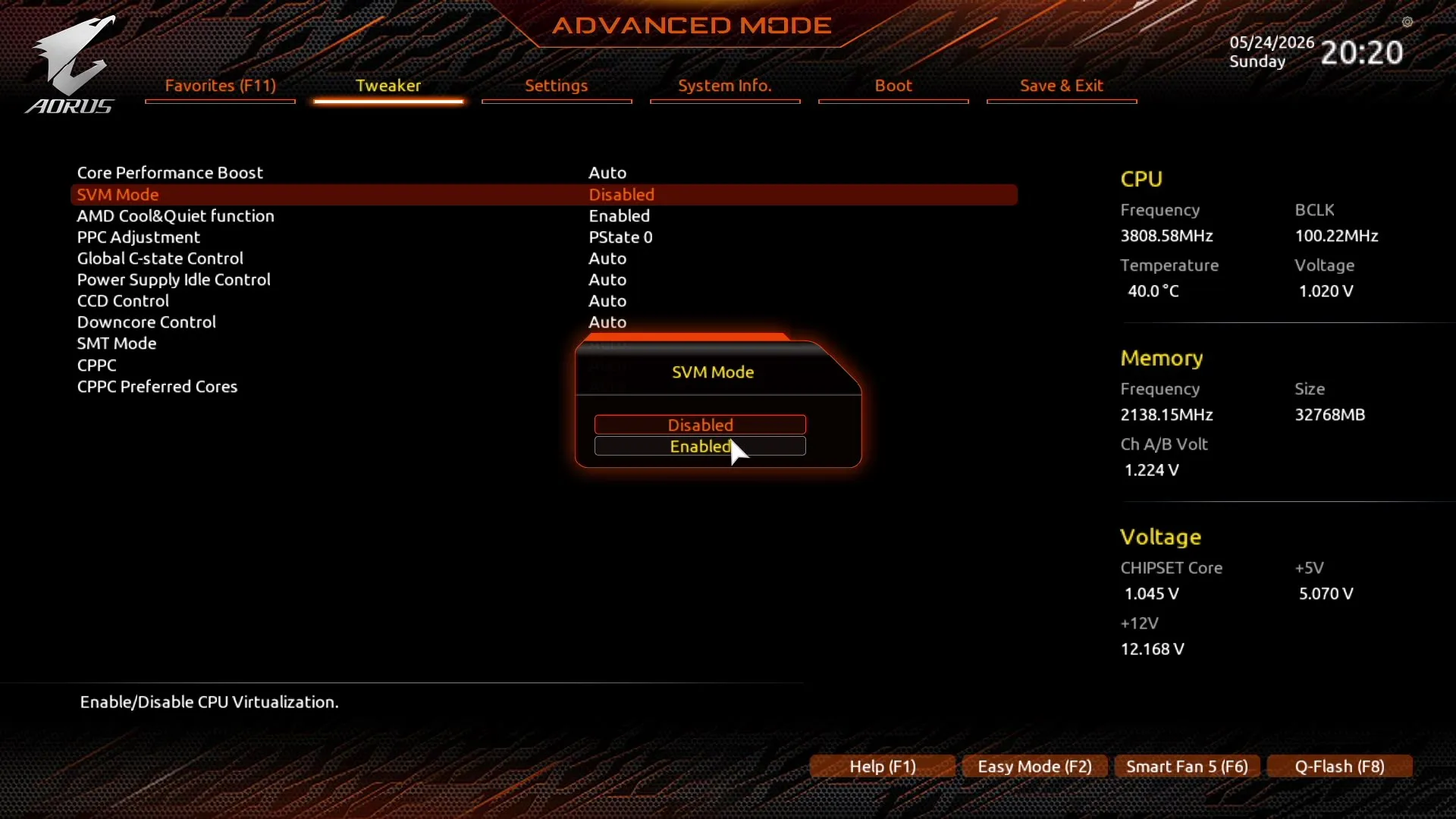
| SVM Mode (AMD virtualization) | Tweaker → Advanced CPU Settings → SVM Mode | Enabled |
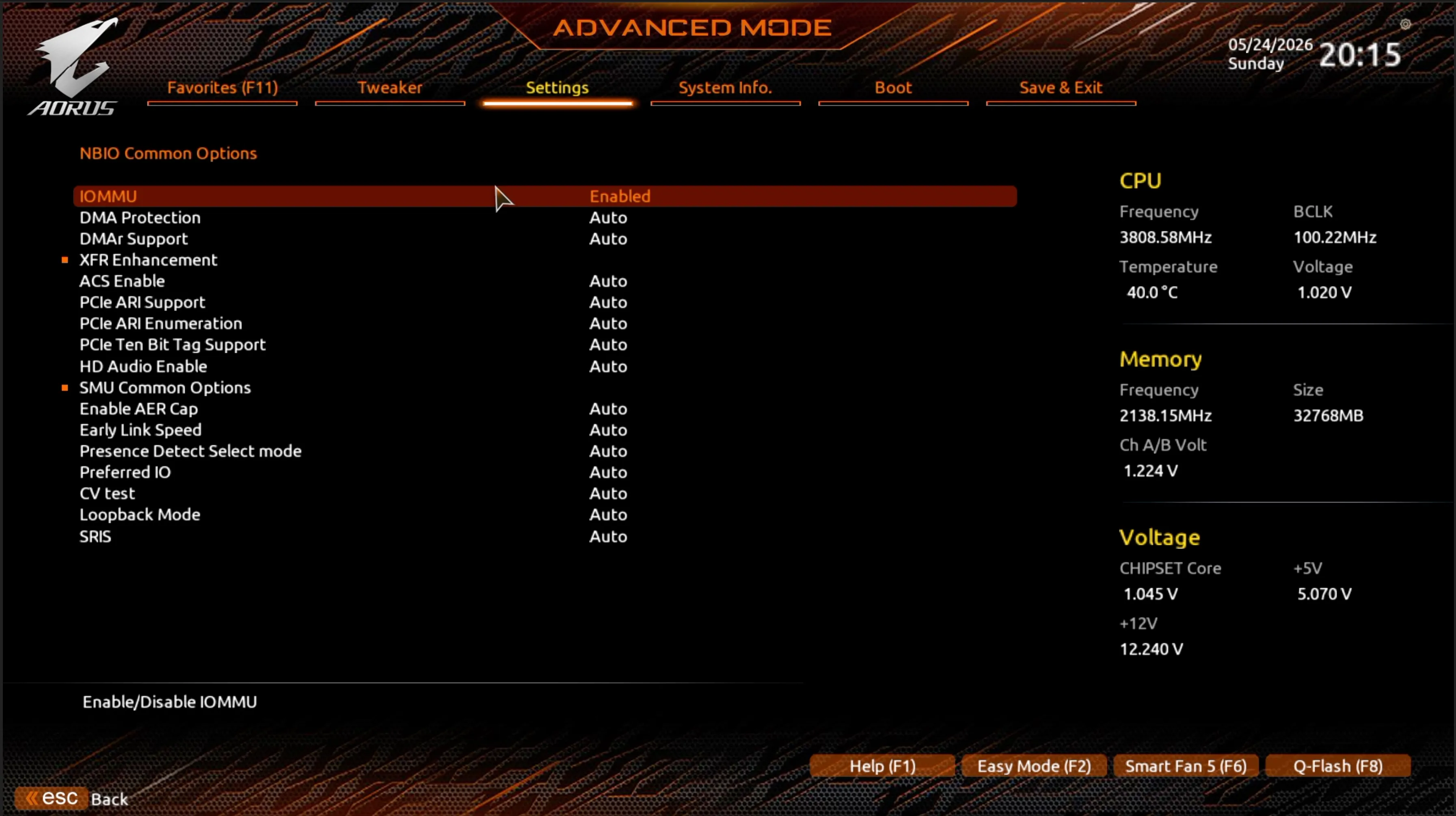
| IOMMU (AMD-Vi) | Settings → AMD CBS → NBIO Common Options → IOMMU | Enabled |
| IOMMU (duplicate path) | Settings → Miscellaneous → IOMMU | Enabled |
| Above 4G Decoding | Settings → IO Ports → Above 4G Decoding | Enabled |
| Re-Size BAR Support | Settings → IO Ports → Re-Size BAR Support | Auto |
| CSM Support | Boot → CSM Support | Disabled |
| Secure Boot | Boot → Secure Boot → Secure Boot Enable | Disabled |
A few notes from actually going through this :
- SVM Mode was not visible under
Settings → AMD CBS → CPU Common Optionswhere most documentation points. On this board revision it lives under the Tweaker tab. It was disabled by default --- this matters, because a Proxmox install without SVM will still work for LXC containers but VMs won’t launch. - IOMMU appears in two menu locations on this board :
Settings → AMD CBS → NBIO Common Options → IOMMUandSettings → Miscellaneous → IOMMU. Both were enabled; they control the same underlying hardware feature. - Above 4G Decoding was already on. CSM was already off. Secure Boot was on and needed to be disabled.
- Boot order confirmed: WD Blue SN570 1TB (NVMe) as Boot Option #1. This drive had a previous Proxmox installation --- the fresh install overwrites it cleanly.
Installer --- disk selection
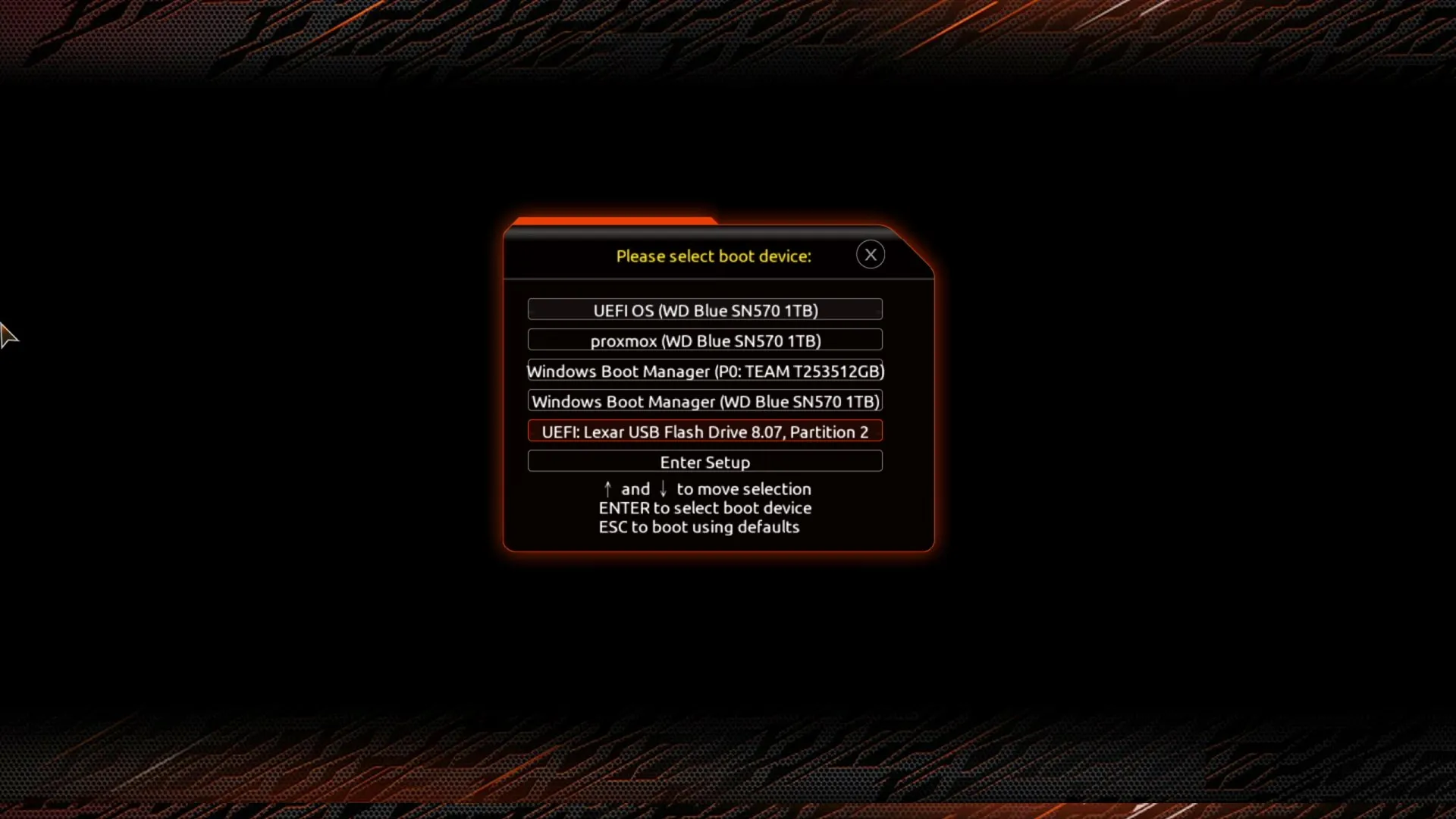
Proxmox VE 9.2, booted via USB (Balena Etcher on macOS), GUI installer. Boot device selection on the Gigabyte board is F12 at POST --- with CSM disabled, the USB stick shows up as a single UEFI entry, so there’s no legacy-vs-UEFI choice to get wrong.
On the installer’s welcome screen, the Target Harddisk dropdown lists every physical disk the installer can see. On this machine that’s all four :
| Device | Size | Model | Action |
|---|---|---|---|
/dev/nvme0n1 | 931.51 GiB | WD Blue SN570 1TB | ✅ Install target |
/dev/sda | 476.94 GiB | TEAM T253512GB | Windows SSD --- leave alone |
/dev/sdb | 1.82 TiB | WDC WD20EFPX-68C | Data pool later --- not now |
/dev/sdc | 1.82 TiB | WDC WD20EFPX-68C | Data pool later --- not now |
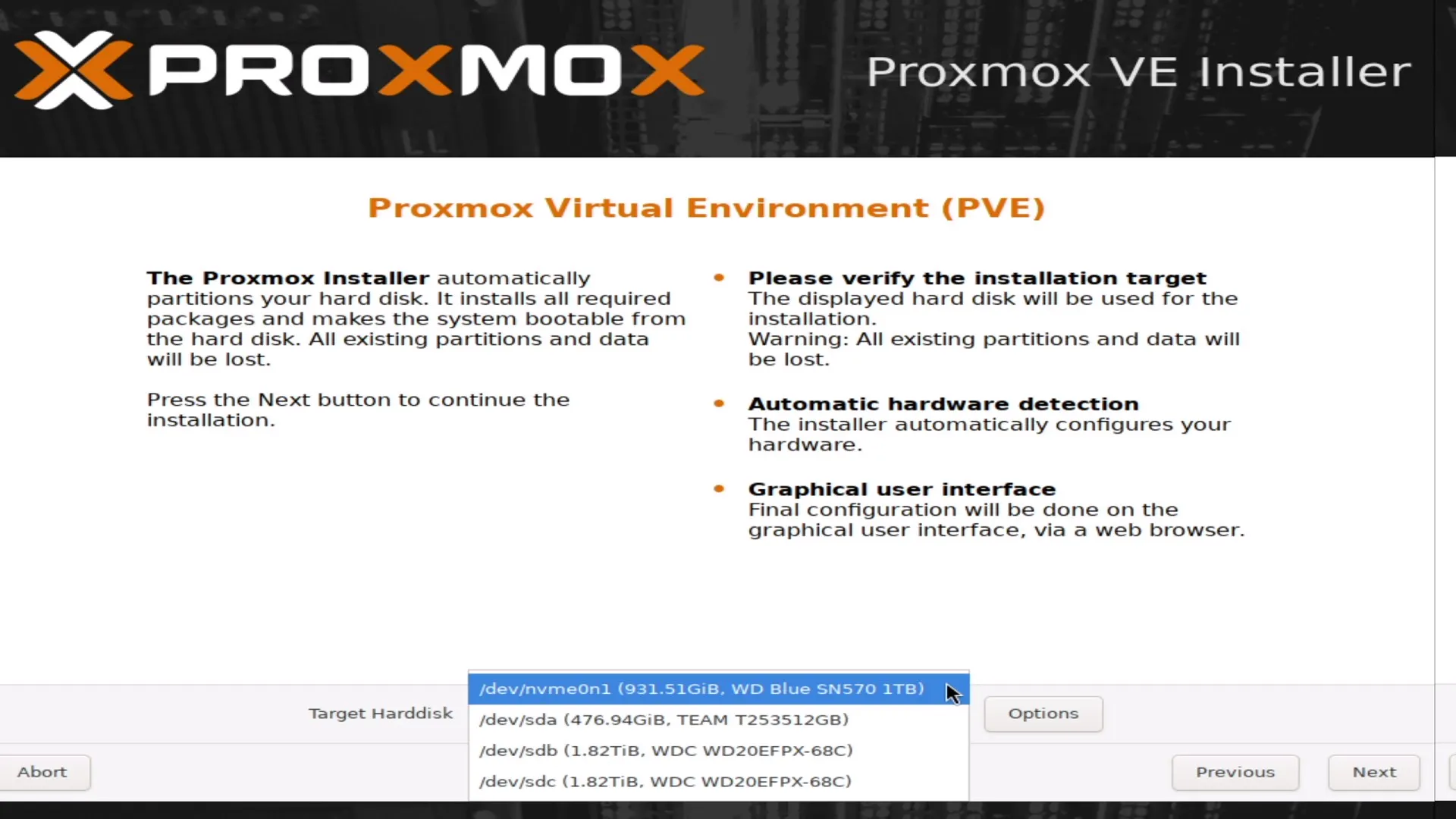
Worth being deliberate here : the Windows SSD (/dev/sda, TEAM T253512GB) is visible to the installer. Proxmox isn’t hiding it, and nothing stops you from selecting it by accident. The point isn’t that Proxmox can’t see Windows --- it’s making sure that drive stays deselected. sdb and sdc are the two 2 TB WD HDDs; they’re left out of the boot pool too, because they’ll become a separate ZFS mirror data pool after install.
With nvme0n1 set as the target, open Options and set the filesystem to zfs (RAID0) --- single-disk ZFS for the boot pool. In the ZFS disk list, only nvme0n1 stays selected; the other three are set to do-not-use. ashift is confirmed at 12 (4K sector alignment for the NVMe).
Installer --- network configuration
The installer auto-detected the network from the onboard Realtek NIC. Values set :
Management Interface : nic0 — d8:5e:d3:d8:93:a1 (r8169)Hostname (FQDN) : pve1.homeIP Address : 192.168.2.121/24Gateway : 192.168.2.1DNS Server : 192.168.2.1Pin network interface names : enabledThe hostname is pve1 to distinguish it from pve2 and pve3 when all three nodes are in the cluster. The IP .121 is in a reserved static range --- the router’s DHCP pool was narrowed to .10–.100 before install to keep all three Proxmox nodes and their LXCs in a clean .101–.254 static block.
Address plan for the cluster :
| Host | IP | Notes |
|---|---|---|
| Router | 192.168.2.1 | Gateway + temporary DNS |
| pve1 (workstation) | 192.168.2.121 | This node |
| pve2 (ProDesk #1) | 192.168.2.122 | Planned |
| pve3 (ProDesk #2) | 192.168.2.123 | Planned |
| DHCP pool | 192.168.2.10–100 | Dynamic clients |
| Static infra | 192.168.2.101–254 | Nodes, LXCs, VMs |
Pin network interface names was left checked --- this is the PVE 9 installer option that pins the interface to a stable nicX name (here, nic0) instead of leaving it on the kernel’s enp* scheme, which can renumber on a hardware or kernel change. Stable names matter once LXC containers and bridges start referencing the interface by name.
Post-install verification
With the node up and reachable via SSH, four things to confirm before touching anything else.
SVM (AMD virtualization):
grep -m1 svm /proc/cpuinfo | grep -o svmReturns svm --- AMD virtualization is on. VMs will launch.
IOMMU active in kernel:
dmesg | grep -e AMD-Vi -e IOMMU | head -5Returns AMD-Vi: IOMMU lines including Interrupt remapping enabled. The BIOS settings took effect.
ZFS boot pool:
zpool statuspool: rpoolstate: ONLINEconfig: NAME STATE rpool ONLINE nvme-eui.e8238fa6bf530001001b448b4b3c1717-part3 ONLINEerrors: No known data errorsSingle-disk ZFS pool on the NVMe partition, healthy.
All drives visible:
lsblkNAME MAJ:MIN RM SIZE RO TYPE MOUNTPOINTSsda 8:0 0 476.9G 0 disk├─sda1 8:1 0 512M 0 part├─sda2 8:2 0 16M 0 part├─sda3 8:3 0 475.4G 0 part└─sda4 8:4 0 990M 0 partsdb 8:16 0 1.8T 0 disk├─sdb1 8:17 0 1.8T 0 part└─sdb9 8:25 0 8M 0 partsdc 8:32 0 1.8T 0 disk├─sdc1 8:33 0 1.8T 0 part└─sdc9 8:41 0 8M 0 partnvme0n1 259:0 0 931.5G 0 disk├─nvme0n1p1 259:1 0 1007K 0 part├─nvme0n1p2 259:2 0 512M 0 part /boot/efi└─nvme0n1p3 259:3 0 931G 0 partsda is the Windows SATA SSD --- partitioned, untouched. nvme0n1p3 is the ZFS boot pool partition. sdb and sdc are the two 2 TB HDDs, and they’re not bare : the sdX1/sdX9 partition pairs are leftover ZFS members from the previous Proxmox install on this machine. They get wiped before they can go into a new pool --- that’s the next section.
IOMMU groups --- the B550 problem and the fix
This is the section I flagged in the design overview. Before configuring any passthrough, I ran the full IOMMU group listing:
for g in /sys/kernel/iommu_groups/*/; do echo "=== Group ${g##*/iommu_groups/} ===" for d in $g/devices/*; do lspci -nns "${d##*/}" 2>/dev/null donedoneThe RTX 5060 Ti was already clean --- its own group, just GPU and audio:
=== Group 16/ ===09:00.0 NVIDIA GB206 [GeForce RTX 5060 Ti] [10de:2d04]09:00.1 NVIDIA GB206 HD Audio [10de:22eb]The RX 6650 XT was not. It shared Group 15 with the SATA controller, USB controller, both network adapters, and the entire B550 chipset PCIe switch infrastructure:
=== Group 15/ ===02:00.0 AMD 500 Series USB controller ← host needs this02:00.1 AMD 500 Series SATA controller ← HDDs are on this02:00.2 AMD PCIe Switch Upstream Port03:00.0 AMD PCIe Switch Downstream Port03:08.0 AMD PCIe Switch Downstream Port03:09.0 AMD PCIe Switch Downstream Port04:00.0 Navi 10 XL Upstream Port (GPU internal switch)05:00.0 Navi 10 XL Downstream Port06:00.0 Radeon RX 6650 XT [1002:73ef]06:00.1 Navi 21/23 HDMI/DP Audio [1002:ab28]07:00.0 Realtek RTL8125 2.5GbE ← management NIC08:00.0 Realtek RTL8822CE WiFiThe RX 6650 XT connects through the B550 chipset PCIe switch, which has no ACS support. Everything downstream of it --- GPU, SATA, NIC --- ends up in one group. Passing through just the GPU without dragging the host’s storage and network adapter with it is not possible as-is.
The problem visually:
Fix: ACS override. Apparently a standard homelab workaround is pcie_acs_override=downstream,multifunction, which forces ACS isolation on PCIe bridges that don’t natively support it.
# Overwrite the EFI boot cmdline --- keep the existing root= and boot= valuesecho "root=ZFS=rpool/ROOT/pve-1 boot=zfs amd_iommu=on iommu=pt pcie_acs_override=downstream,multifunction" > /etc/kernel/cmdline
# Verifycat /etc/kernel/cmdline
# Apply and rebootproxmox-boot-tool refresh && reboot
One thing to ensure : that echo overwrites /etc/kernel/cmdline, it doesn’t append. The root=ZFS=rpool/ROOT/pve-1 and boot=zfs values above are specific to this install --- run cat /etc/kernel/cmdline first and keep whatever root=/boot= values are already there. Only the three IOMMU parameters are being added.
After reboot, confirm the parameters loaded:
cat /proc/cmdline# Should contain: amd_iommu=on iommu=pt pcie_acs_override=downstream,multifunctionThe IOMMU groups after the fix --- every device in its own group:
Group 23: 06:00.0 Radeon RX 6650 XT [1002:73ef] ✅Group 24: 06:00.1 Navi Audio [1002:ab28] ✅Group 27: 09:00.0 RTX 5060 Ti [10de:2d04] ✅Group 28: 09:00.1 RTX 5060 Ti Audio [10de:22eb] ✅Group 16: 02:00.1 SATA controller ✅ host keepsGroup 25: 07:00.0 RTL8125 Ethernet ✅ host keepsThe ACS override splits each function into its own group, so the RX 6650 XT VGA and its audio controller end up in separate groups (23 and 24) rather than paired. That’s fine. When configuring LXC passthrough in the next post, both devices get passed to the same container regardless of group numbers.
ZFS data pool --- mirror on the two HDDs
With the boot pool healthy and IOMMU groups sorted, the next step is creating the data pool. The two 2 TB WD HDDs (sdb and sdc) had leftover partitions from the previous Proxmox install --- ZFS labels on sdb1/sdb9 and sdc1/sdc9. These need to be wiped before zpool create will take the drives.
# Wipe partition signatures first, then the disk-level signatureswipefs -a /dev/sdb1 /dev/sdb9wipefs -a /dev/sdbwipefs -a /dev/sdc1 /dev/sdc9wipefs -a /dev/sdc
# Confirm both drives are clean bare diskslsblk /dev/sdb /dev/sdc
Expected output --- no children, no mountpoints:
NAME MAJ:MIN RM SIZE RO TYPE MOUNTPOINTSsdb 8:16 0 1.8T 0 disksdc 8:32 0 1.8T 0 diskWith both drives clean, create the mirror pool:
zpool create -f -o ashift=12 datapool mirror /dev/sdb /dev/sdcashift=12 sets the minimum sector size to 4K, which matches the physical sectors on modern HDDs even when they report a 512-byte logical sector size. Getting this wrong at pool creation time is permanent --- you’d need to destroy and recreate the pool.
Verify:
zpool status datapoolzpool list pool: datapool state: ONLINEconfig: NAME STATE READ WRITE CKSUM datapool ONLINE 0 0 0 mirror-0 ONLINE 0 0 0 sdb ONLINE 0 0 0 sdc ONLINE 0 0 0
errors: No known data errorsNAME SIZE ALLOC FREE CKSUM HEALTHdatapool 1.81T 396K 1.81T - ONLINErpool 928G 2.01G 926G - ONLINE1.81T usable from a mirror of two 1.8T drives --- expected. The pool is healthy.
Register the pool with Proxmox storage so it appears in the UI as a storage target for VM disks and LXC rootfs volumes:
pvesm add zfspool datapool --pool datapool --content images,rootdirpvesm statusName Type Status Total Used Available %datapool zfspool active 1946381672 409012 1946381672 0.02%local dir active 96669008 2067492 89628452 2.14%local-zfs zfspool active 972722176 2076672 972722176 0.21%datapool is active alongside local and local-zfs. New LXC containers and VM disks created on datapool land on the mirrored HDDs rather than the NVMe boot pool.
ProDesk installs --- pve2 and pve3
The two HP ProDesk 600 G3 nodes are simpler installs than the workstation. No GPU passthrough concerns, no dual-boot constraint, no IOMMU gotchas. Both nodes use the same Proxmox VE 9.2 ISO.
BIOS on both ProDesks (F10 at POST): VT-x and VT-d were already enabled by default on the G3. Secure Boot off, UEFI-only boot mode confirmed. Boot device selection at POST is F9 --- the UEFI USB entry appears there even if the drive doesn’t show correctly in the persistent boot order.
Install values:
| pve2 | pve3 | |
|---|---|---|
| Hostname | pve2.home | pve3.home |
| IP | 192.168.2.122/24 | 192.168.2.123/24 |
| Gateway | 192.168.2.1 | 192.168.2.1 |
| DNS | 192.168.2.1 | 192.168.2.1 |
| Filesystem | zfs (RAID0) | zfs (RAID0) |
Both use ZFS RAID0 on their SSDs --- same reasoning as pve1: snapshot capability and consistent pool semantics are worth it even on a single disk. ashift=12 in Advanced Options on both.
After each install, confirmed reachability before proceeding:
# From each node after first bootping 192.168.2.121 # pve1 reachableCluster formation
With all three nodes up and reachable, the cluster is formed from pve1 and the other two nodes join it.
On pve1 --- create the cluster:
pvecm create pvelab1The cluster name pvelab1 follows the pve naming convention used for the nodes. Avoiding anything workload-specific --- the cluster runs both AI inference and general homelab services.
On pve2 and pve3 --- join the cluster:
pvecm add 192.168.2.121# Enter pve1's root password when promptedVerify from any node:
pvecm nodes Membership information ---------------------- Nodeid Votes Qdevice Name 1 1 - pve1 2 1 - pve2 3 1 - pve3 (local)pvecm statusFinal cluster status from pve3:
Cluster information-------------------Name:             pvelab1Config Version:   3Transport:        knetSecure auth:      on
Quorum information------------------Nodes:            3Quorate:          Yes
Votequorum information----------------------Expected votes:   3Total votes:      3Quorum:           2Flags:            Quorate
Membership information----------------------    Nodeid      Votes Name0x00000001          1 192.168.2.1210x00000002          1 192.168.2.1220x00000003          1 192.168.2.123 (local)
Three nodes, Quorate: Yes, quorum threshold 2-of-3. Losing any single node keeps the cluster operational --- the remaining two maintain quorum.
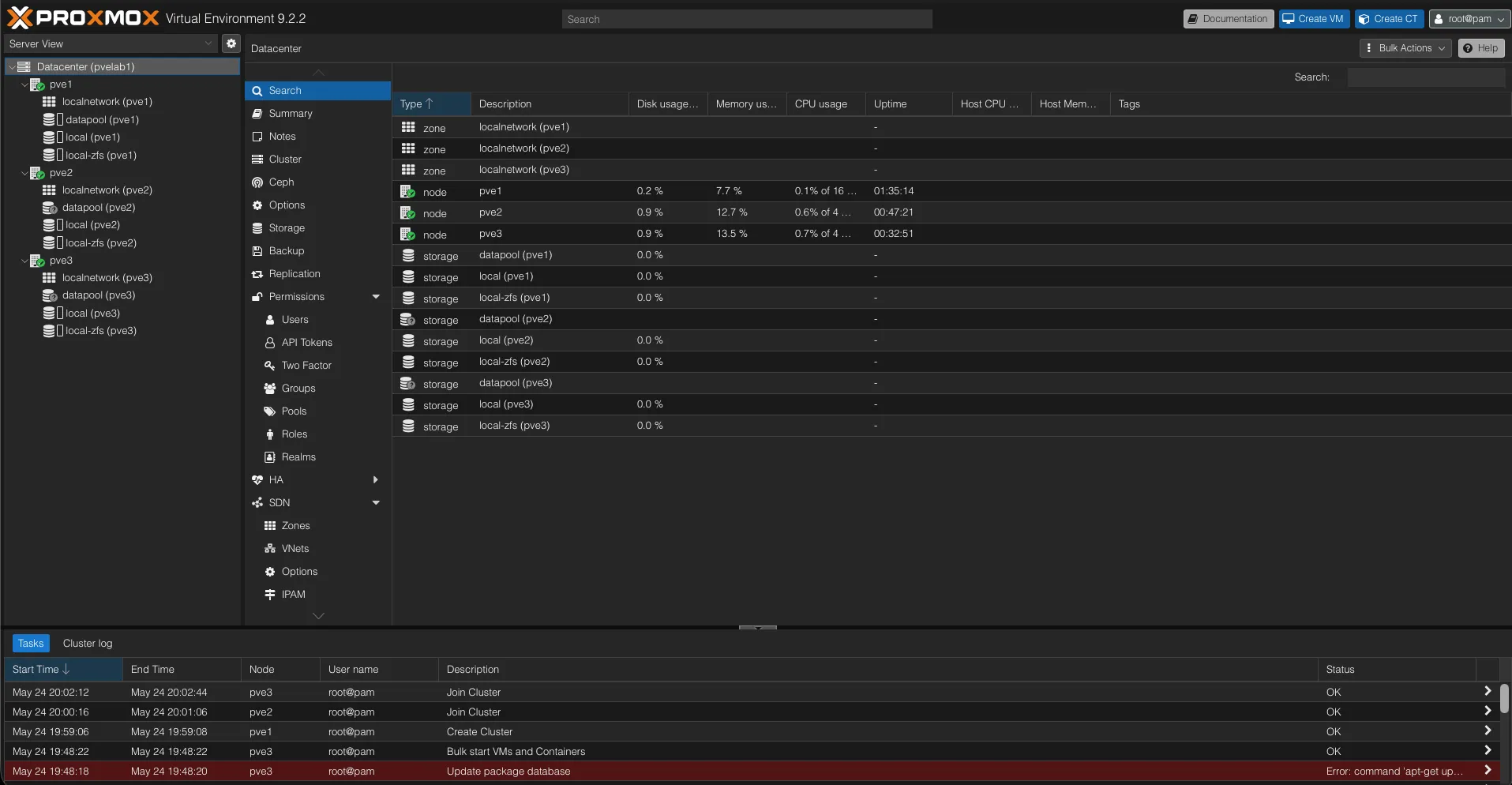
What’s Next
The next post covers the GPU passthrough configuration in detail and gets both Ollama instances running --- NVIDIA with Codestral-22B on CUDA, AMD with a conversational model on ROCm.
Addendum: Setting Up the 1 TB HDDs on PVE2 and PVE3
I missed this in the initial setup writeup. Both ProDesk nodes have a 1 TB WD HDD (/dev/sda) that ships with a single partition covering the full disk. Here’s what I actually ran to get them configured as ZFS pools in Proxmox.
Why ZFS on a Single Spinning Disk
The obvious objection is that ZFS on a single disk gives you no redundancy. True --- but that’s the same as ext4 on a single disk. What ZFS adds on top:
- Snapshots --- useful before updating LXC containers, especially on PVE3 where Nextcloud and Immich data will live.
- lz4 compression --- near-zero CPU overhead, meaningful savings on database volumes and container rootfs. Less useful for Jellyfin/Immich media (already compressed), but doesn’t hurt.
- Native Proxmox integration --- ZFS pools show up as first-class storage in the PVE UI with snapshot management. Directory storage is second-class.
LVM-thin was the other option. Better choice if your primary use is thin-provisioned VM disks at scale. For LXC containers and file-backed services, ZFS wins.
The Commands
Same procedure on both nodes. Confirm disk name first --- on both ProDesks sda is the HDD and nvme0n1 is the Proxmox boot SSD:
lsblk -o NAME,SIZE,TYPE,MOUNTPOINT,MODELWipe the existing partition, create the pool, set properties:
wipefs -a /dev/sdawipefs -a /dev/sda1
zpool create -f \  -o ashift=12 \  pve2-tank /dev/sda        # use pve3-tank on PVE3
zfs set compression=lz4 pve2-tankzfs set atime=off pve2-tank
ashift=12 sets 4K sector alignment --- safe for both 512e and 4K-native HDDs. atime=off avoids a write on every read, which matters on spinning disks.
Register with Proxmox, scoped to the local node:
pvesm add zfspool pve2-tank --pool pve2-tank --content rootdir,images --nodes pve2# on PVE3:pvesm add zfspool pve3-tank --pool pve3-tank --content rootdir,images --nodes pve3The --nodes Flag Matters
Proxmox storage config is cluster-wide --- every storage definition in storage.cfg gets synced to all nodes. Without --nodes, PVE3 will try to import pve2-tank (a pool that only exists on PVE2) and throw a ZFS error on every pvesm status. Adding --nodes pve2 scopes the storage to its home node. The other nodes show it as disabled rather than erroring.
Final State
PVE2: pve2-tank zfspool active ~921 GB (pve3-tank: disabled)PVE3: pve3-tank zfspool active ~921 GB (pve2-tank: disabled)