Local AI Lab --- Setting Up OpenClaw as a Personal AI Gateway
At this point in the series, the inference layer is done. CT 100 is running llama-server on the RTX 5060 Ti at 26 T/s. CT 101 is running llama-server on the RX 6650 XT at 51 T/s. Both expose OpenAI-compatible endpoints on the local network.
What’s missing is a way to actually talk to them. Right now, reaching either model means a raw curl call or opening a chat interface in a browser on the same network. That’s fine for testing, but it’s not a useful daily-driver -- especially if the goal is to reach the stack from my phone over Telegram.
That’s the gateway layer’s job. Before getting into the setup, I want to cover what AI gateways actually do and where this one sits in the stack --- then spend a section on which specific tool to use, because the landscape shifted a lot between when I designed this and when I built it.
What an AI gateway does
The inference containers I built in the last post are good at one thing : taking an HTTP request, running it through a model, and returning a completion. That’s it. They have no concept of conversation history, no way to accept a Signal message, no authentication, no routing logic, no always-on daemon -- nothing outside the raw inference path.
An AI gateway sits in front of those endpoints and handles everything the inference layer deliberately doesn’t. The pattern looks like this:
- Channel adapters : Accept messages from wherever the user actually communicates -- Telegram, Signal, Discord, email. Each channel has its own transport, auth model, and message format. The gateway normalizes all of them to a single internal conversation model.
- Session and memory management : Maintain conversation history across turns so the model has context. Without this, every message is a fresh prompt with no prior state.
- Security and access control : Decide who is allowed to send messages. For a personal homelab this is an allowlist; in a multi-user setup it becomes policy-based.
- Model routing : Decide which backend to call. Primary model, fallback model, model-per-task-type -- the gateway holds that logic so the inference containers don’t need to.
- Always-on daemon : The inference containers can accept requests any time, but someone has to be listening on the channel side. The gateway runs as a persistent systemd service and holds the channel connections open.
Without a gateway, the only way to have a conversation with the local stack is to stay on the same local network and hit the API directly. With one, a message from Telegram on my phone -- anywhere, any time -- reaches the stack.
Where OpenClaw sits in this setup
The diagram below shows the full data flow for this stack. OpenClaw is CT 111 on pve1, sitting between the messaging channels and the inference containers. The Pi coding agent (CT 110) gets added in the next post --- it’s shown here because understanding where it plugs in changes how you think about the routing.
The container numbering reflects the intentional model-to-role pairing: CT 111 (OpenClaw) talks to CT 101 (AMD / Gemma 4 E4B) for conversation, and CT 110 (Pi) talks to CT 100 (NVIDIA / Qwopus) for coding. The 11x range keeps the agent layer visually grouped away from the 10x inference layer.
The solid arrow is live after this post. The dashed arrows complete in the next post.
A few things this diagram makes explicit that are easy to miss:
OpenClaw talks to the AMD container, not the NVIDIA one. Gemma 4 E4B is the conversational model -- lighter, faster (51 T/s vs 26 T/s), and well-suited to the back-and-forth pattern of a messaging channel. Qwopus sits idle from OpenClaw’s perspective; it’s reserved for the coding workload Pi brings in the next post.
Pi is not a replacement for the inference containers. When Pi gets a coding task, it calls CT 100 (llama-server / Qwopus) directly for generation. Pi is the execution harness -- tools, file access, code running. OpenClaw hands off tasks to Pi when they need filesystem access; Pi calls the model the same way OpenClaw does.
OpenClaw has no fallback configured here. In the original design, Qwopus was the primary and Gemma 4 E4B was the fallback. With the roles split, it doesn’t make sense for OpenClaw to fall back to the coding model -- if the AMD container is down, I’d rather know than silently route conversation traffic to a model optimised for code generation. A fallback can always be added later if the AMD container proves unreliable.
Picking the right gateway: OpenClaw, Hermes, and the forks
When I originally scoped this project, OpenClaw was the obvious choice -- it was the most popular self-hosted AI gateway, had native Telegram and Signal support, and the daemon model fit the always-on homelab use case cleanly. Since then, a few things happened that are worth documenting.
The OpenClaw situation
OpenClaw started as “ClawdBot” in November 2025, a solo project by Peter Steinberger. It renamed after an Anthropic cease-and-desist (the original name was a reference to Claude), exploded to 350K+ GitHub stars by early 2026, and then OpenAI announced an acqui-hire of Steinberger in February 2026. That sequence rightfully triggered concern --- fork activity on GitHub spiked 400% in the days after the announcement.
The actual outcome was better than expected. Steinberger transferred ownership to a seven-person technical steering committee and the project was restructured as a 501(c)(3) foundation with OpenAI as a financial sponsor but not a controller. Development accelerated post-transition: 47 merged PRs in the two weeks after the announcement, and the latest release is v2026.5.4 (May 5, 2026 -- three weeks ago from when I’m writing this). The “not maintained” concern was real for a few weeks in February and March; it’s not real now.
That said, there are legitimate ongoing concerns: OpenClaw has had several CVEs in 2026 (patches are available, but the CVE cadence on a 370K-star project is real), and the Node.js architecture does show its origins as a rapid solo build in some edge cases. It’s still the most feature-complete option for the channel management use case.
The “claw family” forks
A minor ecosystem of forks and derivatives emerged after the acquisition scare, and it’s worth knowing what they actually are:
NemoClaw is NVIDIA’s enterprise wrapper, announced at GTC in March 2026. It adds kernel-level sandboxing and a YAML policy engine on top of OpenClaw. Interesting if you’re running multi-user or production workloads; overkill for a personal homelab.
NanoClaw is a security-first reimplementation -- 700 lines of TypeScript with mandatory Docker isolation for every agent execution. The argument is “what you cannot understand, you cannot secure.” Worth watching if the OpenClaw CVE pattern continues, but it doesn’t have feature parity on channels yet.
ZeroClaw is a Rust rewrite focused on resource efficiency: 3.4MB binary, boots in under 10ms, under 5MB RAM steady-state. Relevant for edge or Raspberry Pi deployments; the resource advantages don’t matter much when your gateway is an LXC on a workstation with 32 GB RAM.
None of these are the right answer here. They’re either enterprise-hardening layers (NemoClaw) or stripped-down alternatives that don’t yet match OpenClaw on channel breadth.
Hermes Agent
The more interesting alternative is Hermes Agent from NousResearch, released February 2026. It’s architecturally different from OpenClaw in ways that matter:
- Python, not Node.js -- easier integration with the ML toolchain if the stack expands
- Self-improving -- after solving non-trivial tasks, Hermes writes a “skill document” (Markdown file capturing the approach and edge cases). This is the main differentiator: over time, the agent builds a personal knowledge base from its own experience
- Any OpenAI-compatible endpoint -- covers llama-server directly, no provider-specific config required
- 16+ messaging channels including Telegram and Signal with E2E encryption handling on the Signal path
- SQLite-backed persistent memory with FTS5 full-text search across all past sessions
The trade-off: Hermes is genuinely more ambitious but less mature as a gateway daemon. The channel pairing UX is rougher, the daemon reliability story is less developed, and the documentation is thinner. If the primary need were a coding agent that learns and improves over time, Hermes would be the more interesting choice. For this stack, where the gateway is a routing and channel-management layer (and the agent execution goes to Pi in post 6), OpenClaw’s daemon stability and channel polish matter more.
The call
OpenClaw, current release. The acquisition concerns didn’t materialize into abandonment; the CVEs have patches; and for the channel-management gateway role, it’s still the most complete option. If the security pattern gets worse or NanoClaw catches up on channel support, I’d revisit -- but that’s a future iteration note, not a blocker.
Provider note: llama-server is not Ollama
OpenClaw has a first-class Ollama provider, but I’m not running Ollama -- the inference containers use llama-server (llama.cpp) directly. That was a deliberate choice covered in the llama.cpp post; the short version is that Ollama doesn’t support Qwen3 MTP heads, which is the main reason I’m running Qwopus.
llama-server exposes a proper OpenAI-compatible API at /v1. OpenClaw has a custom provider type (api: "openai-completions") that points at any OpenAI-compat endpoint. That’s what I’ll use for both containers.
One thing to do before writing the config: get the model IDs that llama-server is advertising. By default, it uses the GGUF filepath as the ID, which is unwieldy. The fix is to add --alias to the ExecStart lines in both llama-server systemd units -- do that first.
Prep: static IPs and model aliases
Before touching OpenClaw, two things need to be stable on the inference containers: fixed IPs and short model aliases. The provider config hardcodes both.
Set static IPs
# From pve1 host -- substitute your actual gateway IPpct set 100 --net0 name=eth0,bridge=vmbr0,ip=192.168.2.131/24,gw=192.168.2.1pct set 101 --net0 name=eth0,bridge=vmbr0,ip=192.168.2.132/24,gw=192.168.2.1
pct reboot 100pct reboot 101
# Verifypct exec 100 -- hostname -Ipct exec 101 -- hostname -I
Add --alias to both llama-server units
By default llama-server uses the full GGUF filepath as the model ID, which is unwieldy and breaks if the file moves. The --alias flag gives it a stable short name.
Run each block separately -- do not paste all commands at once:
CT 100 (NVIDIA):
pct enter 100sed -i 's|--n-gpu-layers|--alias qwopus \\\n --n-gpu-layers|' /etc/systemd/system/llama-server.servicesystemctl daemon-reload && systemctl restart llama-servercurl -s http://localhost:8080/v1/models | python3 -c "import sys,json; print(json.load(sys.stdin)['data'][0]['id'])"exitExpected output: qwopus
CT 101 (AMD):
pct enter 101sed -i 's|--n-gpu-layers|--alias gemma4 \\\n --n-gpu-layers|' /etc/systemd/system/llama-server.servicesystemctl daemon-reload && systemctl restart llama-servercurl -s http://localhost:8081/v1/models | python3 -c "import sys,json; print(json.load(sys.stdin)['data'][0]['id'])"exitExpected output: gemma4
Create the OpenClaw LXC (CT 111)
OpenClaw is pure Node.js -- no GPU, no special device access needed. An unprivileged container with 2 vCPU and 4 GB RAM is enough.
# On pve1 hostpct create 111 local:vztmpl/ubuntu-24.04-standard_24.04-2_amd64.tar.zst \  --hostname openclaw \  --storage datapool \  --rootfs datapool:8 \  --cores 2 \  --memory 4096 \  --net0 name=eth0,bridge=vmbr0,ip=dhcp \  --unprivileged 1 \  --features nesting=1
pct start 111pct exec 111 -- bash -c "apt-get update && apt-get install -y curl"
Install OpenClaw
The installer script handles Node 24 detection and installation, then installs OpenClaw globally. The --no-onboard flag skips interactive onboarding so I can configure providers manually before running it.
pct exec 111 -- bash -c \ "curl -fsSL https://openclaw.ai/install.sh | bash -s -- --no-onboard"Verify:
pct exec 111 -- bash -c "openclaw --version"pct exec 111 -- bash -c "openclaw doctor"Configure the model providers
Now I’m inside the container for the rest of this section:
pct exec 111 -- bashOpenClaw only needs the AMD endpoint -- that’s its primary and only model. I’m also registering the NVIDIA provider so it’s available for future use (Pi will call it directly, not through OpenClaw, but having it visible in the config costs nothing and might save me time in the future).
openclaw config set models.providers '{ "llama-amd": { "baseUrl": "http://192.168.2.132:8081/v1", "api": "openai-completions", "apiKey": "llama-local", "timeoutSeconds": 120, "models": [{ "id": "gemma4", "name": "Gemma 4 E4B (AMD)", "input": ["text"], "contextWindow": 32768, "maxTokens": 4096 }] }, "llama-nvidia": { "baseUrl": "http://192.168.2.131:8080/v1", "api": "openai-completions", "apiKey": "llama-local", "timeoutSeconds": 300, "models": [{ "id": "qwopus", "name": "Qwopus3.6-27B (NVIDIA)", "input": ["text"], "contextWindow": 32768, "maxTokens": 8192 }] }}' --strict-json --replaceSet the primary model -- AMD/Gemma 4 E4B only, no fallback:
openclaw config set agents.defaults.model '{ "primary": "llama-amd/gemma4"}' --strict-jsonSmoke test before touching channels:
openclaw infer model run \ --model llama-amd/gemma4 \ --prompt "Reply with exactly: pong" \ --jsonIf this returns cleanly, the AMD endpoint is wired correctly.
Install as a systemd daemon
Proxmox LXC containers don’t expose systemd user services by default -- there’s no active login session when you pct enter, so systemctl --user commands fail. The fix is to enable lingering for root before installing the gateway service:
loginctl enable-linger rootexport XDG_RUNTIME_DIR=/run/user/0mkdir -p $XDG_RUNTIME_DIRThen install and start:
openclaw gateway installsystemctl --user start openclaw-gateway.serviceopenclaw gateway statusThe status output should show running with a pid and Connectivity probe: ok. If it still shows unreachable, check that the XDG_RUNTIME_DIR export was picked up -- you may need to add it to /root/.bashrc for persistence across sessions:
echo 'export XDG_RUNTIME_DIR=/run/user/0' >> /root/.bashrcThe gateway service survives reboots once enabled -- loginctl enable-linger root persists across restarts.
Telegram channel setup
First, create a bot via @BotFather in Telegram: /newbot, follow the prompts, copy the token (format: 123456789:ABCdef...).
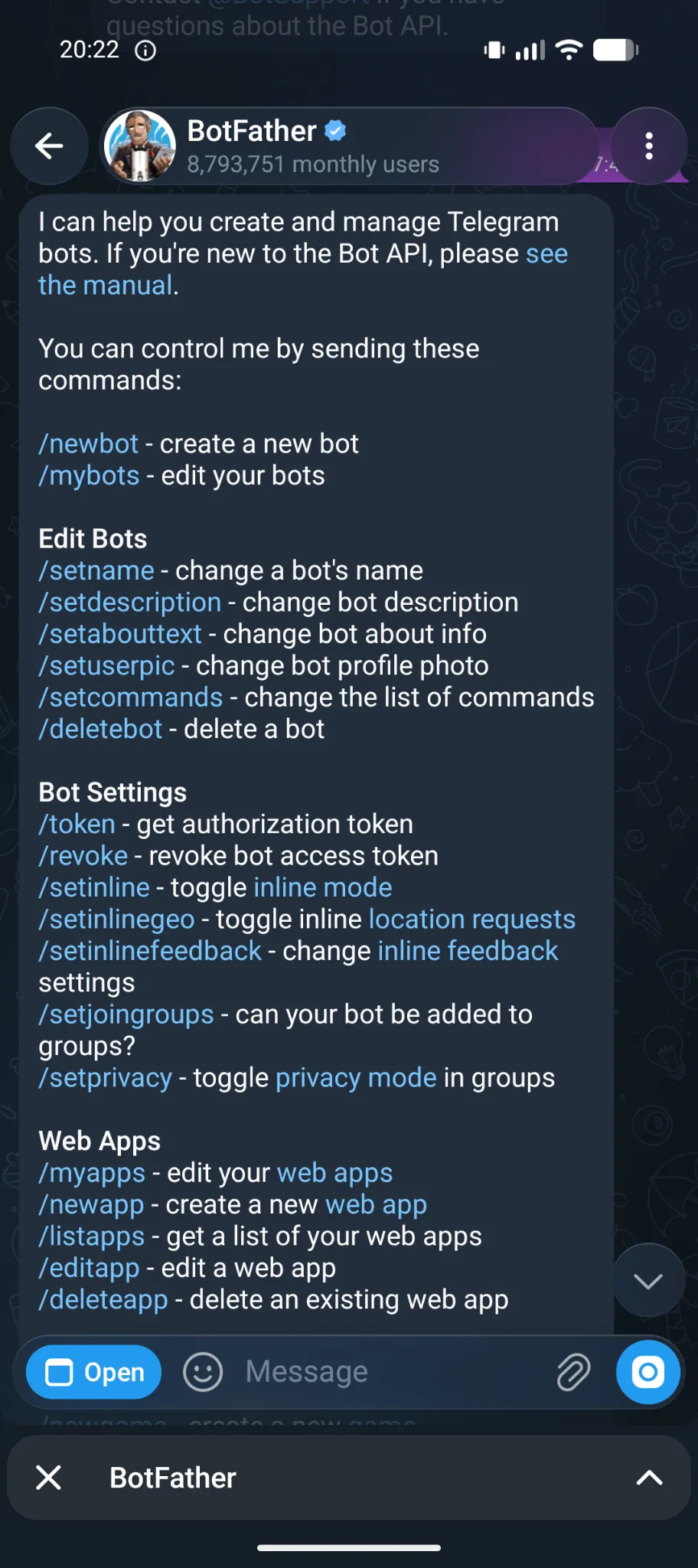
Save the token to a file rather than pasting it directly into the shell -- terminal emulators like Ghostty add bracketed paste escape sequences that corrupt the token string:
nano /root/.openclaw/telegram-token# paste token, Ctrl+X → Y → EnterRun the guided channel setup:
openclaw channels addSelect Telegram, then when prompted for how to provide the token, choose token file and point it at /root/.openclaw/telegram-token. Accept the pairing policy defaults.
Now find the bot in Telegram -- search https://t.me/<your-bot-username> if the name isn’t coming up in search. Send any message. The bot replies with a 6-digit pairing code.
Back in the container, approve it:
openclaw pairing approve telegram <code>Lock the bot down to your Telegram numeric user ID (message @userinfobot to get it):
openclaw config set channels.telegram.dmPolicy "allowlist"openclaw config set channels.telegram.allowFrom '["YOUR_NUMERIC_ID"]' --strict-jsonRestart and test:
openclaw gateway restartSend a message from Telegram. First response should arrive in roughly 4 seconds at 51 T/s.
Context size and compaction
Out of the box, the first real message back from OpenClaw was:
“auto-compaction could not recover this turn -- increase compaction buffer by setting
agents.defaults.compaction.reserveTokensFloorto 20000 or higher”
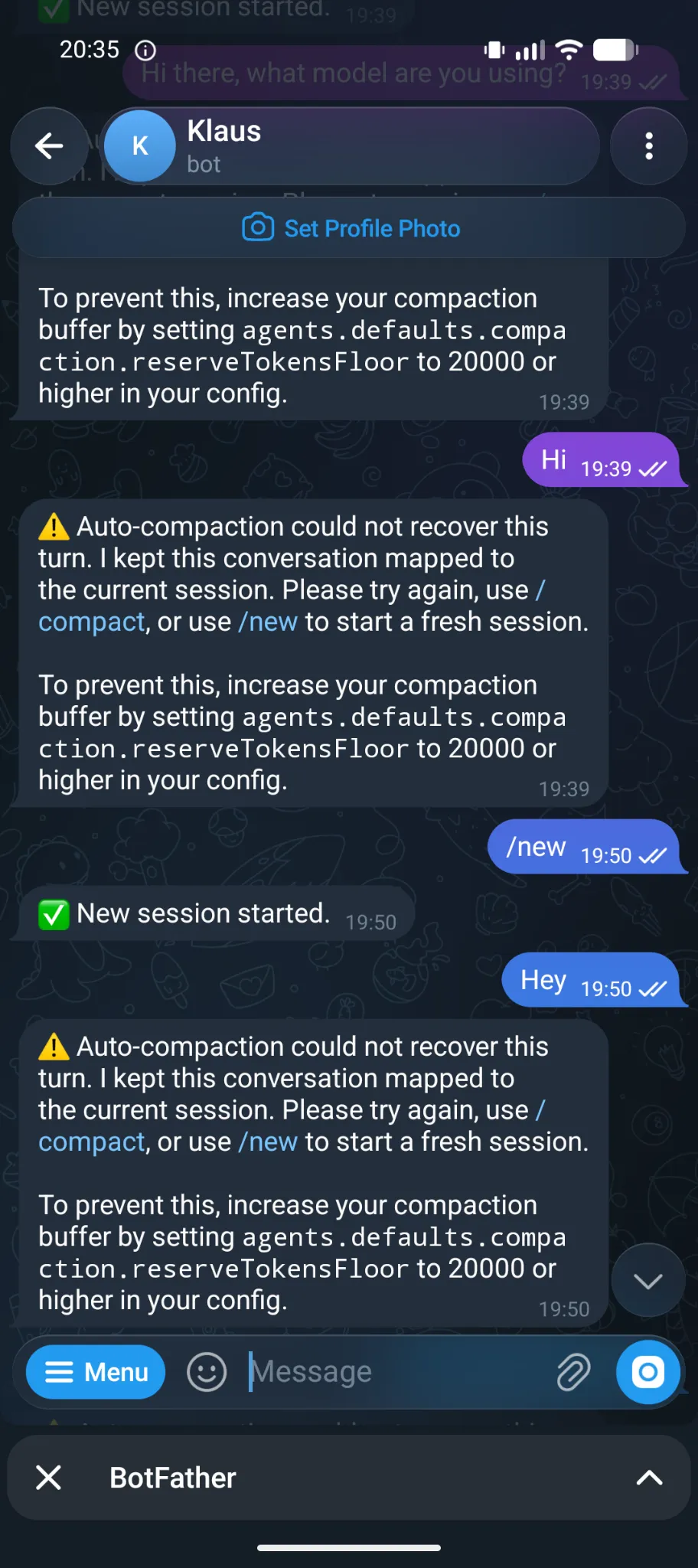
The problem: llama-server was started with --ctx-size 8192 on CT 101, and OpenClaw’s compaction process needs tokens to run its summarization -- at 8192 total, there’s no room. Two fixes required.
1. Increase the server context size on CT 101:
pct enter 101sed -i 's/--ctx-size 8192/--ctx-size 32768/' /etc/systemd/system/llama-server.servicesystemctl daemon-reload && systemctl restart llama-servercurl -s http://localhost:8081/v1/models | python3 -c "import sys,json; print(json.load(sys.stdin)['data'][0]['meta']['n_ctx'])"exitExpected output: 32768. Gemma 4 E4B was trained on 131k context -- 32768 is well within its range, and the RX 6650 XT has enough VRAM headroom with the model loaded at ~3.3 GB.
2. Set the compaction floor:
openclaw config set agents.defaults.compaction.reserveTokensFloor 16000Roughly half the context window is a reasonable floor -- leaves ~16k for conversation and ~16k for the compaction process.
3. Fix the per-model contextWindow in models.json:
OpenClaw writes a derived models.json from the config, but in merge mode the old per-model value (8192) takes precedence over the provider-level update. openclaw config set alone doesn’t fix it -- the file needs to be patched directly:
python3 -c "import jsonwith open('/root/.openclaw/agents/main/agent/models.json') as f: data = json.load(f)data['providers']['llama-amd']['models'][0]['contextWindow'] = 32768data['providers']['llama-amd']['models'][0]['maxTokens'] = 4096with open('/root/.openclaw/agents/main/agent/models.json', 'w') as f: json.dump(data, f, indent=2)print('done')"openclaw gateway restartVerify:
python3 -c "import jsonwith open('/root/.openclaw/agents/main/agent/models.json') as f: data = json.load(f)print(data['providers']['llama-amd']['models'][0]['contextWindow'])"Should print 32768. After this the compaction warning stops and conversations work correctly.
What’s working at this point
After this post, the stack looks like this: a message from Telegram reaches OpenClaw (CT 111), which routes it to Gemma 4 E4B on the AMD container (CT 101) for a response. The NVIDIA container (CT 100 / Qwopus) is idle from OpenClaw’s perspective -- it’s waiting for the Pi coding agent setup in a later post.
What’s not wired yet: the coding execution path. Right now OpenClaw is pure conversation -- it can answer questions and continue a context, but it can’t open files, run code, or interact with the filesystem. That’s the Pi layer (CT 110), which is post 6.
A few things I want to document once I’ve run this for a few days: actual latency from Signal send to first token, whether tool calling works reliably with openai-completions mode on llama-server for Gemma 4 E4B, and whether the role separation holds in practice -- or whether I end up wanting OpenClaw to be able to escalate to Qwopus for heavier reasoning tasks.
What’s Next
Pi Coding Agent setup post covers setting up Pi as the local coding agent --- wired to receive tasks from OpenClaw and executing them against the NVIDIA inference endpoint.